
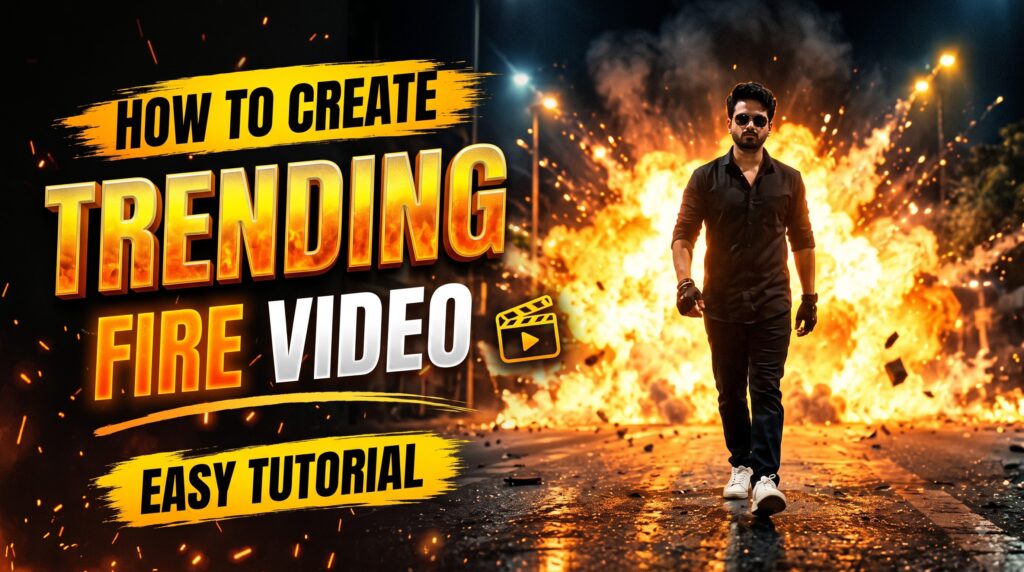
AI-generated videos are becoming more realistic every day, and a new fire explosion video trend is getting attention on Instagram Reels and other social media platforms. In this trend, a person walks calmly on a dark road, throws a burning matchstick behind them, and a huge cinematic fire explosion appears in the background.
The interesting part is that you do not need professional video-editing skills to create this type of video. With a good reference photo, the right prompt, and Google Flow, you can create a similar cinematic AI video.
In this guide, I will explain how to create the trending fire video using Google Flow step by step.
VIRAL VIDEO PROMPT
What Is the Trending Fire Video?
The viral concept is based on a simple action-movie-style scene.
A person walks confidently toward the camera on an empty road at night. Streetlights appear in the background, while the surroundings are dark and slightly misty.
After walking for a few moments, the person throws a lit matchstick backward without looking behind them. A few seconds later, a massive fire explosion appears behind them.
The person continues walking normally without reacting to the explosion.
The combination of the slow confident walk, dark cinematic environment, fire explosion, smoke, glowing embers, and dramatic lighting makes the final video look like a scene from an action movie.
What You Need to Create This AI Video
You only need a few things:
- A clear photo of yourself or the person you want to use
- The fire video prompt
- Access to Google Flow
- An internet connection
- A little patience while the AI generates the video
The most important part is your reference image. Try to use a clear image where the face is visible and the person looks similar to how you want them to appear in the final video.
Step 1: Get the Fire Video Prompt
First, you need the prompt that describes the entire cinematic scene.
You can get the prompt from Astrofite and copy it.
The prompt tells the AI exactly what should happen in the video, including the person’s appearance, camera angle, road, matchstick, explosion, smoke, lighting, and cinematic style.
Copy the complete prompt before moving to Google Flow.
Step 2: Open Google Flow
After copying the prompt, open Google Flow.
Start a new video-generation project and select the option that allows you to work with an image or reference image.
The exact interface and available options may change as Google updates Flow, so some buttons may look slightly different depending on your account and version.
Step 3: Add Your Reference Image
Now upload the photo you want to use as your reference image.
For the best result, choose a photo with:
- A clearly visible face
- Good lighting
- High image quality
- A natural pose
- Minimal blur
- The full or upper body visible if possible
The reference image helps the AI understand the person’s identity and appearance.
Step 4: Paste the Fire Video Prompt
After adding your image, paste the complete prompt into the video-generation prompt box.
Here is the prompt used for this trend:
Trending Fire Video Prompt
Maintain exact face identity and features from [Reference Image 1]. A cinematic medium-to-wide shot of the subject walking forward down the center of an empty asphalt road at night. Symmetrical perspective framed by a row of streetlamps receding into the dark misty background. The subject walks toward the camera with a calm, stoic expression. In one fluid motion, the subject flicks a lit matchstick backward over their shoulder. Seconds later, a massive, fiery cinematic explosion erupts directly behind them, sending billowing clouds of orange flame, bright embers, and smoke across the road. The subject does not flinch or look back, illuminated from behind with intense warm rim lighting and glowing silhouette edges. Filmed on 35mm anamorphic lens, high-contrast night cinematography, action-movie aesthetic, 4K, photorealistic.
Make sure you paste the complete prompt rather than only describing the explosion.
Step 5: Generate the Video
Once your image and prompt are ready, start the generation process.
Google Flow will use the reference image and prompt to create the scene.
The AI needs to understand several things at the same time:
- The identity of the person
- Their movement
- The nighttime road
- The streetlights
- The matchstick action
- The explosion
- The smoke and embers
- The cinematic camera
- The lighting
- The overall action-movie appearance
Because of this, the generation may not always be perfect on the first attempt.
If the first result has a strange face, unnatural body movement, or an unrealistic explosion, try generating another version.
Why the Prompt Works
The prompt is detailed because AI video generators perform better when the scene is clearly described.
For example, the prompt does not simply say:
“Make a person walk with a fire explosion.”
Instead, it describes the complete environment and action.
The location
The prompt specifies an empty asphalt road at night with streetlights disappearing into the background.
This creates the cinematic setting.
The camera
The prompt asks for a medium-to-wide shot and a symmetrical perspective.
This helps create the dramatic composition seen in action movies.
The person’s expression
The subject is instructed to maintain a calm and stoic expression.
This is important because the character is supposed to look confident even when the explosion happens.
The matchstick
The matchstick creates the transition between the person walking and the explosion.
The person throws the lit matchstick backward without looking behind them.
The explosion
The prompt describes:
- Orange flames
- Bright embers
- Smoke
- A large cinematic explosion
- Glowing edges around the subject
These details help make the background effect more dramatic.
How to Make the Video Look More Realistic
If you want a better result, pay attention to your reference image.
A high-quality reference photo generally gives the AI more useful visual information.
Also avoid changing too many things between generations.
For example, if your reference image shows a person wearing a particular outfit, you can keep the appearance consistent rather than asking the AI to completely change the person’s clothing.
The lighting is also important.
The prompt uses warm rim lighting from the explosion. This makes the subject appear naturally connected to the environment instead of looking like a person simply placed in front of a fire effect.
Best Format for Instagram Reels
If you are creating this video for Instagram Reels, use a vertical 9:16 format whenever the generation workflow provides that option.
A vertical video works better for:
- Instagram Reels
- YouTube Shorts
- Facebook Reels
- TikTok
Keep the main subject near the center of the frame so that important parts of the scene are not cropped when posting.
Common Problems and Solutions
1. Face Does Not Look Correct
If the generated face looks different from the reference image, try using a clearer reference photo.
Avoid heavily edited, blurry, or low-resolution images.
2. Explosion Looks Fake
Generate another version or make the environment and lighting more detailed in the prompt.
The explosion should interact naturally with the road, smoke, and surrounding light.
3. Person Looks Back
The prompt specifically says that the subject should not look back.
If the AI still makes the person look at the explosion, regenerate the scene.
4. Walking Looks Unnatural
Use a reference image with a natural body position and avoid extremely complicated poses.
Simple movements usually produce more consistent AI-video results.
5. Fire Covers the Person
If the explosion becomes too large and covers the subject, try another generation where the explosion remains behind the person.
The goal is to keep the person clearly visible while the fire creates the dramatic background.
How to Make Your Fire Video More Viral
Creating the video is only the first step. Presentation also matters.
You can add suitable cinematic music during editing and use a short caption that creates curiosity.
For example:
“POV: You walked away like nothing happened 🔥”
You can also use a short hook at the beginning of your Reel to encourage viewers to watch until the explosion happens.
Do not make the video unnecessarily long. The main action should happen quickly enough to maintain viewer attention.
Is This Video Real?
No. The fire explosion and cinematic scene are AI-generated.
The purpose of this trend is creative entertainment. The final result can look surprisingly realistic because modern AI video tools can generate cinematic lighting, motion, smoke, fire, and camera effects.
However, viewers should not assume that every realistic-looking AI video they see online is an actual recording.
Final Thoughts
The trending fire video is a great example of how AI video generation can turn an ordinary photograph into a cinematic action scene.
The process is quite simple:
Get the prompt → Open Google Flow → Upload your reference image → Paste the prompt → Generate the video → Review the result → Regenerate if needed → Edit and post.
The most important things are a good reference image and a detailed prompt. If the first generation is not perfect, don’t worry. AI video generation can produce different results from one generation to another, so trying again can often give you a better result.
If you want to recreate this viral fire explosion video trend, follow the steps above and experiment with your own photos and cinematic ideas.
Frequently Asked Questions
1. Can I create the fire video using my own photo?
Yes. You can use your own suitable reference photo and provide it to the image-to-video workflow in Google Flow.
2. What prompt is used for the trending fire video?
The prompt provided in this article describes a person walking on a nighttime road, throwing a lit matchstick backward, followed by a large cinematic fire explosion.
3. Can I make this video in 9:16?
Yes, use a vertical 9:16 format when available if your goal is Instagram Reels or YouTube Shorts.
4. Why does my generated face look different?
The result can depend on the quality and angle of your reference image. Try a clear, high-quality image where the face is easily visible.
5. Can I generate the video in one attempt?
Sometimes you may get a good result on the first generation, but AI-generated videos can vary. If the face, movement, fire, or camera motion is not right, generate another version.
Table of Contents

Pratiksha Thakare is a Vedic astrology writer and spiritual researcher with deep study in Jyotish, numerology, and Hindu philosophy. She writes to make ancient wisdom simple and accessible for modern Indian readers.