
Navratri is not only about Garba, Dandiya, music, and traditional fashion anymore. In 2026, AI-generated Instagram Reels are adding a completely new twist to festive content.
One of the popular ideas is the Navratri Outfit Change AI Video, where a person starts in a normal casual outfit and transforms into different colorful Navratri looks with a simple remote-control click or glitch-style transition.
The interesting part is that you do not need to shoot four separate fashion videos. With an AI video generator such as Google Flow or Gemini, a clear reference photo, and a carefully written prompt, you can create a similar concept with your own face.
This guide explains the Navratri Outfit Change AI Video Prompt 2026, how the effect works, what images you need, how to maintain face consistency, and how to edit the final clips for Instagram Reels.
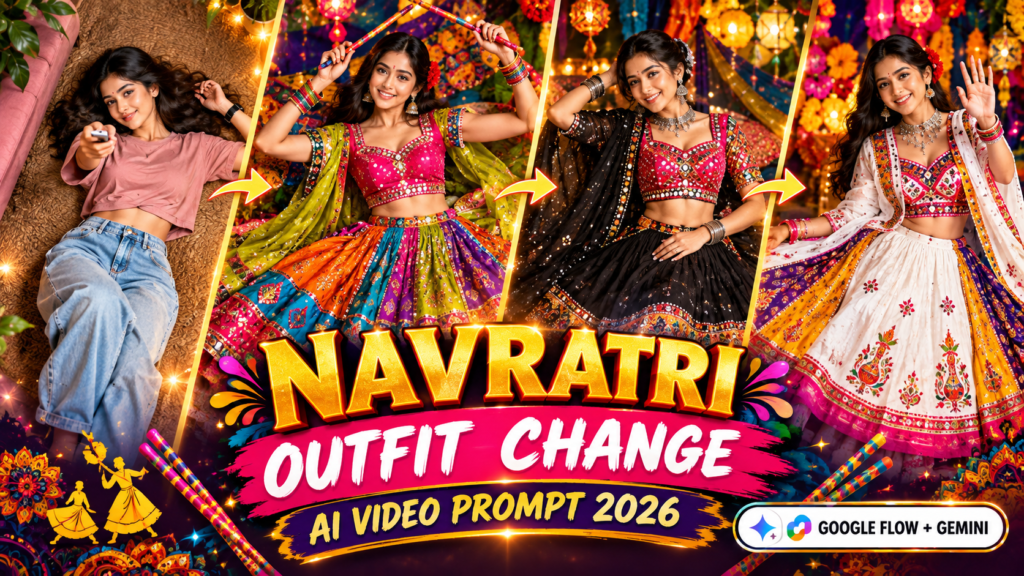
Navratri Outfit Change AI Video Prompt And Reference Video 2026
Copy the following prompt and customize it according to your own reference image and desired outfit
“`html “`What Is the Navratri Outfit Change AI Video?
The concept is simple.
Imagine lying on a carpet while looking directly toward the camera. You hold a TV remote and point it upward. When you press the button, the screen appears to “change channels,” but instead of changing a TV channel, your outfit changes.
For example:
Casual clothes → Rainbow Chaniya Choli → Black Kutchi outfit → White Navratri Lehenga
The camera remains directly above the person, creating a top-down fashion-video effect. This angle is especially useful because the AI can show the complete spread of a lehenga or chaniya choli around the person.
The researched version uses a short video with four different looks and quick outfit transformations.
| Element | What Happens |
|---|---|
| Starting look | Casual top and jeans |
| Trigger | Person clicks a TV remote |
| Transition | Quick flash/glitch effect |
| Look 2 | Colorful chaniya choli |
| Look 3 | Black Kutchi-style outfit |
| Look 4 | White-panel festive lehenga |
| Camera | Fixed overhead/top-down |
| Format | Vertical 9:16 |
Why Is This AI Navratri Video Idea So Attractive?
There are several reasons this concept works well for short-form content.
1. The transformation happens quickly
People immediately understand that something is about to change when they see the remote.
The first few seconds act like a visual hook. Instead of waiting for a long introduction, the viewer gets a transformation almost immediately.
2. Traditional fashion looks impressive from above
A colorful lehenga looks very different when viewed from a top-down camera.
The skirt can spread around the person like a large circular design, making the colors, embroidery, borders, and patterns more visible.
3. It combines technology with Indian culture
AI video generation is modern, while Navratri clothing is traditional. Combining both gives creators a fresh format for Instagram Reels.
4. You can personalize the concept
The most useful feature is personalization. Instead of using a random AI-generated character, you can provide your own suitable reference photo and ask the AI to maintain the person’s identity throughout the video.
The research recommends using a clear, front-facing image with good lighting.
What Do You Need to Create the Video?
You don’t need a professional camera setup.
The basic requirements are:
- A clear face/reference photo
- An AI video-generation tool
- A detailed Navratri outfit prompt
- A vertical 9:16 video format
- An editing application such as CapCut or VN
- A suitable festive or Garba soundtrack
Think of the reference photo as the “identity anchor” for the AI. A blurry photograph is like giving a painter a badly printed passport photo—the result becomes much harder to reproduce accurately.
| Requirement | Recommended Choice |
|---|---|
| Face photo | Clear and front-facing |
| Lighting | Bright and even |
| Video ratio | 9:16 |
| Camera style | Fixed top-down |
| Video length | Around 8–10 seconds |
| Outfit details | Very specific |
| Editing | CapCut or VN |
| Music | Suitable Navratri/Garba track |
Navratri Outfit Ideas Used in the Transformation
A major reason the prompt can produce interesting results is the amount of detail given to each outfit.
Casual Starting Look
The video begins with a simple everyday appearance.
The researched concept uses:
- Dusty pink oversized cropped top
- Light blue high-waisted baggy jeans
- Bare feet
- Smartwatch
- Silver TV remote
The purpose of this first look is contrast. When the festive outfit appears, the transformation feels much more dramatic.
Rainbow Chaniya Choli
The second look introduces bright festive colors.
It can include:
- Fuchsia-pink blouse
- Teal detailing
- Gold mirror work
- Multicolored tiered skirt
- Yellow-green dupatta
- Silver jhumkas
- Colorful bangles
- Dandiya sticks
- Red flower in the hair
The skirt should appear spread across the floor so the viewer can clearly see its layers.
Black Kutchi-Inspired Look
The third look changes the color palette completely.
Important elements include:
- Black flared skirt
- Gold mirror-work border
- Multicolor patchwork
- Pink blouse
- Black net dupatta
- Oxidized jewelry
- Neat bun hairstyle
This contrast helps prevent every transformation from looking visually similar.
White-Panel Festive Lehenga
The final outfit can use a brighter base:
- White central skirt panel
- Pink and red embroidery
- Mustard-yellow panels
- Purple detailing
- Hot-pink border
- White dupatta
- Red flower
- Festive jewelry
The character can finish by smiling and waving toward the camera.
The source research describes these four outfit concepts in detail.
How to Create the Navratri AI Video Step by Step
Step 1: Prepare Your Photo
Choose a clear photograph.
A front-facing image with good lighting is preferable. Avoid heavily filtered photographs because excessive filters can make identity consistency more difficult.
Step 2: Open Your AI Video Tool
Use the video-generation option available in your preferred AI platform.
The researched workflow specifically discusses Google Flow and Gemini for this type of creation.
Step 3: Upload Your Reference Image
Upload your photo as the identity/reference image.
Make sure the face is clearly visible.
Step 4: Add the Prompt
Paste the complete prompt and make sure the video is set to a 9:16 vertical format.
This is important because Instagram Reels are designed primarily for vertical viewing.
Step 5: Generate the Video
Generate the first version and check:
- Is the face consistent?
- Is the camera actually overhead?
- Does the remote appear correctly?
- Are the outfits changing at the right moments?
- Are the hands and fingers realistic?
- Does the skirt spread naturally?
Don’t worry if the first generation isn’t perfect.
AI video generation often requires a few attempts.
What If the AI Changes the Face?
This is one of the biggest problems with AI-generated transformation videos.
If the identity changes between scenes, try these methods:
- Use a clearer reference image.
- Repeat the identity-preservation instruction.
- Avoid unnecessary camera movement.
- Reduce the number of transformations in one generation.
- Generate two shorter clips instead of forcing everything into one clip.
The source research also recommends splitting the sequence into separate clips when maintaining all four outfits in one generation becomes difficult.
| Problem | Possible Solution |
|---|---|
| Face looks different | Use a clearer reference photo |
| Outfit is incorrect | Add more clothing details |
| Camera moves | Explicitly request a locked overhead camera |
| Hands look strange | Reduce unnecessary hand movement |
| Too many mistakes | Generate shorter clips |
| Skirt doesn’t spread | Describe the skirt as fully fanned out |
| Transition looks weak | Add a stronger flash/glitch instruction |
Google Flow vs Gemini vs Editing Apps
Different tools can be useful at different stages.
| Tool | Best Use |
|---|---|
| Google Flow | AI video generation |
| Gemini | Prompt-based AI video creation |
| CapCut | Editing, transitions and music |
| VN | Joining clips and basic editing |
| ChatGPT | Creating or refining outfit concepts/prompts |
The original research also presents these tools as having different roles rather than treating every platform as a replacement for the others.
How to Make the Final Reel Look Better
After generating the clips, you can improve the result in an editing app.
Try the following:
- Cut exactly on the remote-click moment.
- Add a short flash effect.
- Synchronize the transformation with the music beat.
- Keep the first transformation very quick.
- Avoid adding too many unnecessary effects.
- Use a clean 9:16 export.
- Watch the complete Reel before posting.
A simple edit is often better than covering an AI video with dozens of effects.
For example, imagine a dancer changing clothes on every beat of a song. If the outfit changes happen exactly with the beat, the transformation feels intentional. If they happen randomly, the video feels unfinished.
Common Mistakes to Avoid
Using a Low-Quality Face Photo
A blurry image gives the AI less visual information.
Giving a Short Prompt
“Create a Navratri dress” is too vague.
Instead, mention the colors, fabric style, borders, jewelry, hairstyle and overall appearance.
Adding Too Many Outfits
Trying to squeeze a large number of transformations into a tiny video can reduce consistency.
Four distinct looks are already enough for a strong short-form concept.
Moving the Camera
The overhead composition is an important part of this concept. A moving camera can make the outfit transformation less consistent.
Ignoring Privacy
Only use your own photograph or an image for which you have permission. Avoid uploading someone else’s private image simply because you want to test an AI effect.
Is the Viral Navratri AI Video Real?
Yes, the concept itself is an AI-generated video workflow, not a claim that someone is physically changing outfits through a remote.
The remote is simply a creative visual trigger. The AI generates the transformation, while an editing app can be used to strengthen the glitch effect.
This distinction matters because viral Reels can sometimes make AI effects appear like real camera tricks.
Think of it like a movie special effect: when a superhero suddenly changes clothes between two frames, the transformation is part of the production—not something that physically happened in front of the camera.
Frequently Asked Questions
Is the Navratri Outfit Change AI Video free to make?
Some AI tools may offer limited free generation or trial access, while availability and limits can change. Editing apps may also have both free and paid features.
Can I use my own face in the Navratri AI video?
Yes, if the AI tool supports reference images, you can use a suitable photo of yourself. Use only images that you own or have permission to use.
What aspect ratio should I use?
Use 9:16 vertical format for an Instagram Reel-style video.
Why does my outfit look different from the prompt?
AI video generators may interpret clothing details differently. Make the colors, patterns, borders, jewelry and hairstyle more specific. If necessary, create individual outfit clips instead of putting everything into one generation.
Can boys create a Navratri outfit-change AI video?
Yes. The same concept can be adapted with men’s Navratri outfits such as colorful kurtas, kediyas, jackets, dhotis or festive traditional looks.
Final Words
The Navratri Outfit Change AI Video Prompt 2026 is a creative way to combine traditional Indian fashion with modern AI video generation.
The main idea is simple: start with a casual look, use a remote-click visual trigger, and transform the character into several colorful Navratri outfits using quick glitch-style transitions.
For the best result, focus on three things: a clear reference image, a detailed prompt, and a consistent top-down camera angle.
If the complete four-look video is difficult to generate in one attempt, don’t force it. Create shorter clips, keep the identity and camera position consistent, and combine everything later in CapCut or VN.
With the right prompt and a little editing, you can turn a simple photograph into a festive AI Reel that feels much more creative and personalized.
Table of Contents

Pratiksha Thakare is a Vedic astrology writer and spiritual researcher with deep study in Jyotish, numerology, and Hindu philosophy. She writes to make ancient wisdom simple and accessible for modern Indian readers.