
AI-generated devotional videos are becoming extremely popular on Instagram Reels, YouTube Shorts and other short-video platforms. One of the most eye-catching styles is a cinematic Goddess Durga walking video, where Durga Maa slowly walks forward through a divine red flower-covered environment while a tiger walks beside her.
The reference video you provided has a dramatic, cinematic look: it begins with a close-up of Durga Maa’s feet, then shows glowing footprints and gradually reveals the full Goddess with multiple arms, traditional red clothing, jewellery, a crown, and a tiger. The background contains ancient temple-like ruins, warm golden sunlight, red flowers, floating petals, and divine glowing effects.
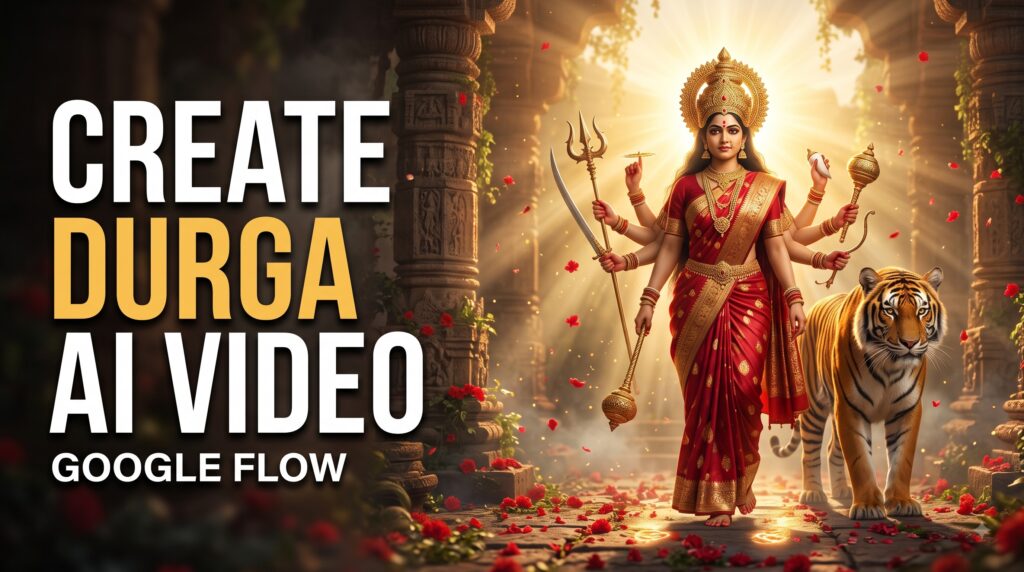
Goddess Durga AI Video Prompt
Reference Video
What Is This Goddess Durga AI Video Trend?
This video style combines several cinematic AI effects into one short devotional sequence.
The main concept is:
Durga Maa slowly walks forward while the camera follows her from a low cinematic angle.
During the video:
- Her feet move naturally across a flower-covered path.
- Glowing footprints appear as she walks.
- Red flower petals move through the air.
- Her saree and hair move naturally in the wind.
- Her jewellery reacts subtly to her movement.
- A tiger walks beside her.
- Her multiple arms remain visually consistent.
- Weapons such as the trident and other divine objects remain in her hands.
- A warm golden divine light appears behind her.
- The camera gradually changes from a close-up shot to a wide cinematic reveal.
- The entire scene has a powerful devotional and mythological atmosphere.
This makes the final result look more like a cinematic mythological movie scene rather than a normal AI animation.
What You Need Before Starting
You mainly need three things:
1. A Good Reference Image
Start with a high-quality image of Goddess Durga.
For the best result, the image should clearly show:
- Face
- Crown
- Red saree
- Jewellery
- Multiple arms
- Divine weapons
- Tiger
- Background
- Full-body composition
A vertical 9:16 image is recommended if your final destination is Instagram Reels or YouTube Shorts.
2. Google Flow
Use Google Flow for the image-to-video generation.
The exact interface and available generation options can change over time, so the names of individual controls may look different depending on your account and current Flow version.
3. A Detailed Motion Prompt
The image tells the AI what the scene looks like.
The prompt tells the AI what should happen inside that scene.
This distinction is very important.
Step 1: Create the Starting Image
Before generating the video, create or select a suitable Goddess Durga image.
Your image should preferably have:
Aspect ratio: 9:16
Style: Photorealistic cinematic mythology
Lighting: Warm golden sunlight
Clothing: Traditional red saree
Environment: Ancient divine temple/ruins
Companion: Bengal tiger
Mood: Powerful, peaceful and divine
Try to avoid images where the face is blurry or the arms are poorly generated.
The better your starting image is, the better your image-to-video result will generally be.
Step 2: Open Google Flow
Open Google Flow and start an image-to-video generation workflow.
Upload your Goddess Durga image as the reference/start frame.
The important thing is to tell the model that the uploaded image should be treated as the visual identity and composition reference.
Don’t ask the model to completely redesign the Goddess.
Instead, ask it to animate the existing scene.
This helps reduce unwanted changes to:
- Face
- Crown
- Jewellery
- Saree
- Number of arms
- Weapons
- Tiger
- Overall composition
Step 3: Use Image-to-Video Instead of Text-to-Video
For this particular trend, image-to-video is preferable because you already have the visual design.
With text-to-video, the AI has to create everything itself.
That can result in:
- Different faces
- Different clothing
- Missing arms
- Extra arms
- Changing jewellery
- Changing tiger appearance
- Different weapons
- Inconsistent backgrounds
Image-to-video gives the model a visual foundation.
Step 4: Add the Main Motion Prompt
Now paste the following prompt into the video generation prompt box.
Google Flow Goddess Durga Image-to-Video Prompt
Create a cinematic devotional mythological video from the supplied reference image.

Use the uploaded image as the primary visual reference and preserve the exact appearance, facial identity, crown, red saree, jewellery, divine weapons, multiple arms, body proportions, tiger, flowers and overall environment throughout the entire video.

The Goddess must remain visually consistent from beginning to end. Do not redesign her face, clothing, crown or jewellery. Do not add or remove arms or weapons.

Create a powerful 10-second vertical 9:16 cinematic sequence.

SHOT 1 — OPENING CLOSE-UP:
Begin with an extremely cinematic low-angle close-up of the Goddess's bare feet slowly stepping forward on a path completely covered with red flower petals and marigold flowers.

Her anklets and traditional foot jewellery move naturally with every step. Her toes and feet move naturally and realistically. As her foot touches the ground, a subtle warm golden divine glow spreads beneath it.

Small flower petals move naturally around her feet.

The camera remains very low near ground level with shallow depth of field. The foreground flowers are softly blurred while the moving foot remains sharply focused.

SHOT 2 — DIVINE FOOTPRINTS:
As the Goddess continues walking forward, each step creates a subtle glowing golden footprint on the red flower-covered ground.

The glowing footprints should appear naturally one after another behind her.

The effect must look elegant, spiritual and cinematic rather than artificial or cartoon-like.

The camera slowly tracks backward while maintaining focus on her movement.

SHOT 3 — CAMERA REVEAL:
Gradually raise and pull the camera backward to reveal more of the Goddess's body.

Her red saree flows gently in the wind.

The fabric should move naturally with realistic cloth physics.

Her long dark hair moves softly with the breeze.

Her jewellery catches the warm sunlight and produces subtle realistic highlights.

Her multiple arms remain stable and correctly positioned throughout the shot.

All divine weapons remain properly aligned in her hands and should not morph or disappear.

SHOT 4 — TIGER REVEAL:
As the camera continues pulling back, reveal the majestic tiger walking calmly beside the Goddess.

The tiger should move naturally with realistic walking motion.

Its legs, paws, head and tail should move naturally.

Keep the tiger's appearance consistent throughout the entire video.

The tiger should look powerful and majestic but peaceful, acting as the Goddess's divine companion.

SHOT 5 — FULL CINEMATIC REVEAL:
Finish with a wide cinematic shot showing the complete Goddess standing/walking forward with the tiger beside her.

Reveal the ancient divine temple ruins and giant stone structures in the background.

The environment should contain red flowers, marigold flowers, floating petals, light mist, warm sunlight and subtle divine particles.

A strong golden heavenly light should appear behind the Goddess, creating a beautiful halo-like backlight.

Sun rays should pass naturally through the atmospheric mist.

The scene should feel majestic, spiritual, powerful and sacred.

CAMERA:
Use smooth cinematic camera movement throughout the video.

Start with a very low ground-level close-up.

Slowly track backward as the Goddess walks forward.

Gradually raise the camera from the feet toward the full body.

End with a wide heroic cinematic composition.

Use realistic depth of field, natural motion blur, subtle lens breathing and smooth camera stabilization.

LIGHTING:
Use warm golden-hour lighting with strong volumetric sun rays.

Create a soft divine glow around the Goddess without overexposing her face.

Use realistic reflections on jewellery and weapons.

The red saree, flowers and background should have rich cinematic detail.

ATMOSPHERE:
Red flower petals should slowly float through the air.

A gentle wind should move the saree, hair and flowers.

Add subtle golden particles around the Goddess.

Maintain a peaceful but powerful devotional atmosphere.

VISUAL STYLE:
Photorealistic cinematic mythology.

High detail.

Realistic skin and fabric texture.

Realistic hair movement.

Realistic jewellery.

Realistic tiger fur.

Natural cloth physics.

Cinematic depth of field.

Volumetric lighting.

High-end Indian mythological film aesthetic.

The result should look like a professionally shot cinematic devotional scene rather than an AI animation.

IMPORTANT CONSISTENCY RULES:
Do not change the Goddess's face.
Do not change her crown.
Do not change her saree design.
Do not change her jewellery.
Do not change the number of arms.
Do not create extra fingers or limbs.
Do not remove any weapons.
Do not change the tiger's appearance.
Do not introduce additional people.
Do not change the overall color palette.
Do not create distorted anatomy.
Do not make the Goddess cartoon-like.

Keep the movement slow, graceful, majestic and realistic.

End with the Goddess and tiger centered in a powerful divine wide shot with golden sunlight behind them.
Step 5: Why This Prompt Works
A common mistake with AI video generation is using a very short prompt such as:
“Make Goddess Durga walk with a tiger.”
Although this is understandable, it doesn’t provide enough information about the animation.
The AI then has to decide:
- How should she walk?
- Where should the camera be?
- What should happen first?
- What should happen next?
- How should the tiger move?
- What should the background do?
- How should the lighting change?
The detailed prompt solves this by dividing the video into visual stages.
The Video Structure
The reference video can be thought of as a simple cinematic progression:
| Time | Scene |
|---|---|
| 0–2 sec | Close-up of feet |
| 2–4 sec | Glowing footprints and walking |
| 4–6 sec | Camera reveals Goddess |
| 6–8 sec | Tiger becomes visible |
| 8–10 sec | Full divine cinematic reveal |
This structure is particularly useful for short-form videos because it creates a visual reveal.
The viewer doesn’t see everything immediately.
Instead, the video starts with a mystery.
First they see the feet.
Then the glowing footprints.
Then the red saree.
Then the multiple arms.
Then the tiger.
Finally, the complete divine scene.
How to Make the Walking Movement More Realistic
One of the hardest parts of AI video generation is human walking.
If the prompt simply says “walk forward,” AI can sometimes generate unnatural legs or sliding feet.
That’s why the prompt specifically says:
“slowly stepping forward”
and:
“realistic walking motion”
and:
“camera slowly tracks backward.”
These instructions establish a clear relationship between the subject and camera.
The Goddess should move forward while the camera moves backward.
This produces a much more cinematic effect.
How to Keep the Face Consistent
If your starting image has a specific Goddess face, consistency becomes very important.
Use language such as:
“preserve the exact facial identity and appearance from the supplied reference image.”
Also avoid asking Flow to change:
- hairstyle
- facial expression
- crown
- makeup
- jewellery
- clothing
The more unnecessary changes you request, the greater the chance that the generated video will drift away from the original image.
How to Get the Glowing Footprint Effect
The glowing footprints are one of the most attractive parts of this concept.
Instead of asking for a huge supernatural explosion, use a subtle effect.
The prompt asks for:
“a subtle warm golden divine glow spreads beneath it.”
This produces a more elegant devotional effect.
You can also add:
“Each footprint briefly glows and slowly fades as the next step appears.”
If Flow interprets the effect correctly, it can create a beautiful trail behind the Goddess.
How to Animate the Tiger
Don’t make the tiger run.
The reference style works better when the tiger walks calmly beside Goddess Durga.
Use:
“The tiger should move naturally with realistic walking motion.”
This is important because exaggerated animal movement can make the video look artificial.
The tiger should feel like a majestic companion rather than the main action.
Recommended Visual Settings
For Instagram Reels and YouTube Shorts, use:
Aspect Ratio: 9:16
Video Length: Around 8–10 seconds
Style: Cinematic / Photorealistic
Camera: Smooth tracking shot
Motion: Slow and graceful
Lighting: Golden hour + volumetric rays
Environment: Ancient temple ruins
Color palette: Red, orange and gold
Mood: Divine, powerful, peaceful
Tips for Better Google Flow Results
1. Use a High-Quality Starting Image
Don’t start with a tiny or blurry image.
A sharp reference image gives the model more visual information.
2. Keep the Composition Simple
The Goddess should be clearly visible.
Avoid an image with too many people or objects.
3. Don’t Overuse Camera Movements
Too many instructions such as:
- zoom in
- zoom out
- rotate
- orbit
- pan left
- pan right
- tilt
- shake
can confuse the generation.
For this concept, a slow backward tracking camera is enough.
4. Keep the Motion Slow
Devotional cinematic videos usually look better with slow movement.
Fast movement can create:
- distorted hands
- unstable faces
- unnatural feet
- tiger deformation
- cloth artifacts
5. Generate Multiple Versions
Don’t expect every generation to be perfect.
Generate several variations and look for the one with:
- best face consistency
- natural walking
- correct tiger
- stable arms
- good lighting
- realistic clothing movement
Then use the strongest version.
Common Problems and Solutions
Problem 1: Goddess’s Face Changes
Solution: Strengthen the reference instruction:
“Preserve the exact facial appearance from the supplied image throughout the entire video.”
Problem 2: Extra Arms Appear
This can happen when the model tries to animate a multi-armed character.
Add:
“Maintain exactly the same number and arrangement of arms as the reference image.”
Problem 3: Tiger Looks Distorted
Use a clear tiger reference in the starting image and add:
“Keep the tiger anatomically realistic and visually consistent throughout the entire sequence.”
Problem 4: Feet Look Strange
Use a stronger instruction:
“Natural human foot anatomy, realistic stepping motion, accurate contact between feet and ground, no sliding.”
Problem 5: Saree Doesn’t Move Naturally
Add:
“Use realistic cloth physics with gentle wind movement. The saree should flow naturally without changing its design.”
Optional Negative Instructions
If your Flow workflow benefits from additional restrictions, you can add this at the end of the prompt:
Avoid cartoon style, anime style, plastic skin, distorted face, changing face, extra limbs, missing limbs, extra fingers, malformed hands, duplicated weapons, disappearing weapons, warped jewellery, changing crown, distorted tiger, unrealistic animal anatomy, excessive camera shake, fast movement, unnatural walking, floating feet, sliding feet, flickering objects, background morphing, random people, text, subtitles, logos and watermarks.How to Make It More Viral for Instagram Reels
Once you have generated the video, you can improve it further in your video editor.
Use:
9:16 vertical format
Add a suitable devotional audio track that you have the rights to use.
You can also add a very short text overlay such as:
“Jai Mata Di ❤️🙏”
or
“Maa Durga Blessings ✨”
Keep the text small and away from the main subject.
Don’t cover the Goddess’s face or important visual details.
Final Workflow
The complete process is:
Step 1: Create a high-quality Goddess Durga image.
↓
Step 2: Make sure the image is suitable for 9:16.
↓
Step 3: Open Google Flow.
↓
Step 4: Select an image-to-video workflow.
↓
Step 5: Upload the Goddess Durga image.
↓
Step 6: Paste the detailed prompt from this article.
↓
Step 7: Generate the video.
↓
Step 8: Check face, arms, hands, feet and tiger consistency.
↓
Step 9: Generate another variation if necessary.
↓
Step 10: Choose the best result and edit it for Instagram Reels or YouTube Shorts.
Final Result
With the right starting image and prompt, you can create a cinematic sequence where Goddess Durga walks through a divine flower-covered ancient temple environment, glowing footprints appear beneath her feet, her red saree flows in the wind, flower petals float through the air, a majestic tiger walks beside her, and golden sunlight creates a powerful divine atmosphere.
The key to getting this type of result is not simply asking AI to “animate the image.” You need to describe the subject movement, camera movement, environment movement, lighting, timing and consistency separately.
That gives Google Flow a much clearer understanding of the scene you want to create.
Table of Contents

Pratiksha Thakare is a Vedic astrology writer and spiritual researcher with deep study in Jyotish, numerology, and Hindu philosophy. She writes to make ancient wisdom simple and accessible for modern Indian readers.