
Navratri is one of those festivals where fashion, music, colours and creativity come together. Every year, new Garba and traditional outfit trends appear on Instagram Reels and YouTube Shorts. In 2026, AI video generation has added another interesting idea to this trend: Navratri dress transformation videos.
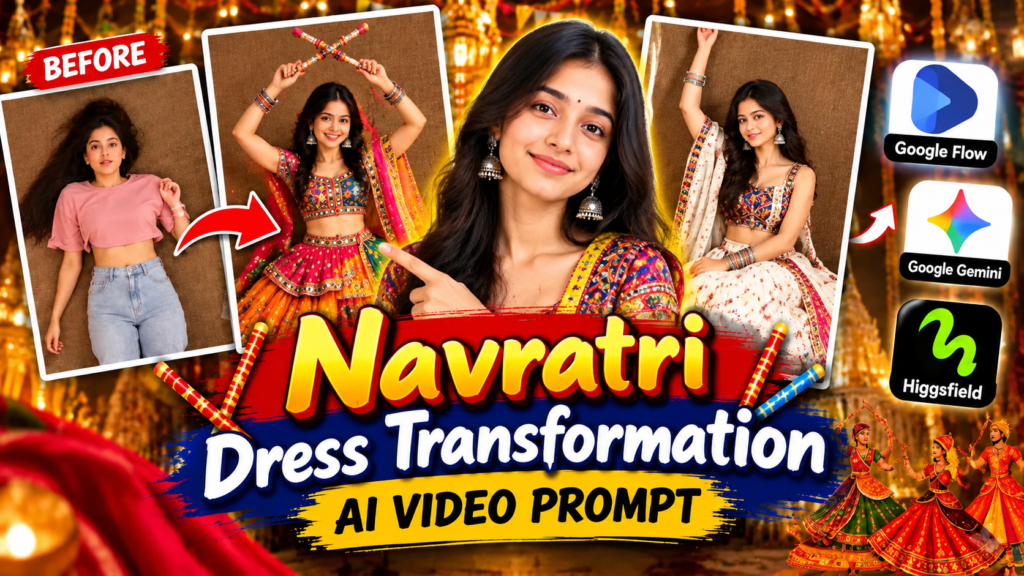
In this type of video, a person starts in a simple everyday outfit and then changes into one or more colourful Navratri looks through a cinematic AI transition. The transformation can include a chaniya choli, lehenga, jewellery, dupatta, festive lighting and a traditional celebration-inspired atmosphere.
Navratri Dress Transformation Video Prompt
Transformation Reference Video
What Is a Navratri Dress Transformation AI Video?
A Navratri dress transformation video is a short AI-generated video in which the subject’s appearance changes from a casual outfit into a traditional festive look.
A simple concept could look like this:
Casual Outfit → Visual Transition → Navratri Dress → Jewellery → Festive Look
Instead of manually recording several outfit changes, the AI model creates the transition according to your instructions.
For example, the first scene can show a person wearing jeans and a casual top. A quick flash or transition can then reveal the same person wearing a colourful chaniya choli. Another transition can introduce a second traditional outfit.
The final result can be edited into a short vertical video suitable for social media.
What You Need to Make the Video
Before starting, keep these four things ready:
- A clear photo of the person
- A suitable transformation reference video
- A detailed AI video prompt
- Access to an AI video-generation tool
Your source photo is especially important because it provides the visual identity that you want the generated video to follow.
A reference video can help communicate the type of movement and transformation you want, while the written prompt explains the details that may not be obvious from the reference.
Which AI Tool Can You Use?
The exact features available to you can depend on the platform, account and current availability. For this workflow, Google Flow can be used as the primary option when its reference-based video features are available to your account.
Other AI platforms may also offer image-to-video or reference-based generation features. The important thing is not simply choosing a tool; it is giving the model clear instructions about:
- Identity
- Camera position
- Outfit
- Transition
- Movement
- Lighting
- Duration
- Aspect ratio
- Overall visual style
For this tutorial, the workflow is designed around a Google Flow-style image/reference-to-video process.
How to Prepare Your Photo
Do not start with a random low-quality screenshot if you want a cleaner result.
Try to use a photograph where:
- The face is clearly visible.
- The image is reasonably sharp.
- Lighting is not extremely dark.
- The face is not covered by sunglasses, hair or another object.
- The subject is not heavily blurred.
- Important facial features are easy for the AI model to identify.
A clear source image gives the model a better starting point for maintaining the subject’s appearance.
If your photo has poor lighting, you can first improve the image with an AI image editor and then use the improved version as the video reference.
How to Choose a Reference Video
The reference video should demonstrate the type of transformation you want.
For example, you can look for a short video where:
- The camera position remains stable.
- The subject stays in approximately the same position.
- The outfit changes through quick transitions.
- The movement is easy to understand.
- There are no complicated camera movements.
The reference is mainly a visual guide. You should not assume that the AI will reproduce every frame perfectly.
The written prompt should explain the result you actually want.
Step-by-Step: Create Navratri Dress Transformation Video
Step 1: Open Your AI Video Tool
Open the AI video-generation platform available to you and create a new video project.
If your account provides image/reference inputs, prepare your source photo and reference video before generating the clip.
Step 2: Add Your Photo
Upload the photograph that represents the person you want to appear in the video.
Tell the AI that this image is the identity reference.
This is important because simply uploading an image does not always explain which parts of the image should be preserved.
Step 3: Add the Reference Video
If the platform supports video references, upload your selected transformation video.
Use it as a guide for the movement and transition concept.
Do not depend entirely on the reference. Your written prompt should remain the main instruction for the final appearance.
Step 4: Select a Vertical Format
For Instagram Reels and YouTube Shorts, a 9:16 vertical composition is generally the most suitable choice.
A vertical frame uses the available mobile screen more effectively and makes the subject easier to see when people are watching short-form content.
Step 5: Add the AI Video Prompt
Paste a detailed prompt describing the scene, identity, clothing, transition, camera and movement.
Here is a newly written prompt you can experiment with:
Navratri AI Video Prompt
Create a 10-second photorealistic vertical 9:16 fashion transformation video using the uploaded photograph as the identity reference.

IDENTITY:
Keep the person's facial identity consistent throughout the entire video. Preserve the same face shape, eyes, nose, lips, skin tone, hairstyle characteristics and natural facial proportions. Do not replace the person with another face.

OPENING SCENE:
Show the subject in a simple modern casual outfit in a clean indoor setting. Use a stable overhead camera angle with the subject positioned naturally in the center of the frame. The subject looks toward the camera with a relaxed and confident expression.

TRANSFORMATION:
At approximately 2 seconds, create a quick elegant flash transition. The subject remains in the same physical position while the clothing changes naturally into a colourful traditional Navratri outfit.

FIRST NAVRATRI LOOK:
Create a vibrant Gujarati-inspired chaniya choli with a flared skirt, detailed mirror work, colourful embroidery, a traditional blouse and a lightweight dupatta. Use rich festive shades such as pink, turquoise, orange, purple and yellow. Add realistic silver or oxidized jewellery, traditional earrings and colourful bangles.

SECOND LOOK:
After another smooth transition, change the outfit into a sophisticated Navratri lehenga featuring detailed embroidery, mirror-work accents, a decorative border and a flowing dupatta. Keep the clothing culturally appropriate, elegant and realistic.

TRANSITION STYLE:
Use short rhythmic flash transitions inspired by a television channel-change effect. Each transformation should happen quickly but smoothly. Avoid melting clothing, distorted bodies or unnatural morphing.

CAMERA:
Keep the camera position consistent throughout the transformation. Do not randomly zoom, rotate or change the perspective. Maintain stable framing so the outfit changes are easy to notice.

MOTION:
Use subtle realistic movement such as natural blinking, slight head movement, gentle hand motion and small fabric movement. The clothing and dupatta should react naturally to movement.

LIGHTING:
Use warm cinematic studio lighting with realistic highlights and soft shadows. Make the embroidery, mirror work, jewellery and fabric textures clearly visible.

VISUAL QUALITY:
Photorealistic fashion-video appearance, realistic skin texture, detailed fabric, physically believable shadows, natural hair, realistic jewellery reflections and smooth motion.

SOCIAL MEDIA FORMAT:
Vertical 9:16 composition, approximately 10 seconds, designed for a short-form social media Reel.

NEGATIVE INSTRUCTIONS:
Do not change the person's identity, do not create a different face, no distorted hands, no extra fingers, no extra limbs, no broken jewellery, no blurry clothing, no random camera movement, no cartoon appearance, no text, no watermark, no logo and no unrealistic body deformation.
How to Get a More Realistic Transformation
One of the biggest problems with AI videos is inconsistency. The first frame may look excellent, but the face, hands or clothing can change unexpectedly during the transition.
You can reduce some of these problems by making your instructions specific.
1. Keep the Camera Consistent
If the subject is supposed to remain in the same position, clearly state that the camera should remain locked.
This gives the transformation a cleaner visual effect.
2. Describe the Clothing
Instead of writing only “traditional Navratri dress”, describe the outfit.
For example, mention:
- Chaniya choli
- Flared skirt
- Mirror work
- Embroidery
- Dupatta
- Traditional jewellery
- Bangles
- Decorative borders
The more important the visual element, the more clearly it should be described.
3. Mention Identity Consistency
If the person’s face is important, explicitly instruct the model to preserve the uploaded person’s identity.
Avoid unnecessary changes to the face.
4. Keep Movement Simple
Complicated movements can make AI-generated videos less stable.
For a transformation Reel, simple movements such as blinking, smiling, small hand movements and gentle fabric motion can be enough.
Why 9:16 Is Good for Instagram Reels?
Most people watch short-form social content on their phones. A vertical video can therefore use the screen more efficiently.
For a Navratri transformation video, 9:16 also gives enough vertical space to show:
- Face
- Jewellery
- Upper body
- Outfit
- Dupatta
- Skirt movement
If your final video is specifically intended for another platform, check that platform’s current recommended dimensions before exporting.
What If the First AI Generation Is Bad?
Do not assume that the first generation will always be perfect.
AI video models can sometimes produce:
- Different facial features
- Strange hands
- Incorrect clothing colours
- Unnatural transitions
- Moving backgrounds
- Distorted jewellery
- Unwanted camera movement
If this happens, try improving one thing at a time.
Try a Better Source Photo
A sharper photograph with a clearly visible face may produce a better starting point.
Simplify the Scene
If the prompt contains too many actions, remove unnecessary movements.
Strengthen the Identity Instruction
Repeat the important identity requirement in a concise way.
Make the Transition Clearer
Instead of asking for a vague “magical transformation”, describe exactly how the change should happen.
For example:
Flash → outfit changes → same pose → camera remains fixed
This gives the AI a more understandable sequence.
How to Make the Navratri Outfit Look Better
Traditional clothing contains many small visual details, and AI sometimes struggles with them.
If the outfit looks generic, specify details such as:
- Mirror-work borders
- Embroidered patterns
- Layered skirt
- Traditional dupatta
- Oxidized earrings
- Colourful bangles
- Decorative waist ornaments
- Detailed fabric texture
However, avoid filling the prompt with unnecessary descriptions. Focus on the elements that matter most to the final shot.
How to Turn the Result Into an Instagram Reel
Once the AI video is generated, watch the entire clip before uploading it.
Check:
- Is the face consistent?
- Does the outfit change smoothly?
- Are the hands natural?
- Are the colours correct?
- Is the video vertical?
- Is there unwanted text or a watermark?
- Does the opening immediately show what is happening?
- Does the ending look natural?
If everything looks good, you can edit the video with your preferred mobile or desktop editor.
You can then add suitable music, a short caption and relevant hashtags.
Caption Ideas for Navratri AI Video
Here are some original caption ideas:
Caption 1:
From everyday style to Navratri vibes ✨
Caption 2:
A little AI, a lot of festive energy ❤️✨
Caption 3:
My Navratri look, reimagined with AI 💫
Caption 4:
One photo. Multiple festive looks. ✨
Caption 5:
Ready for Garba night in an AI-generated look? 💃
Navratri AI Video Prompt: Common Mistakes to Avoid
If you want better results, avoid these common mistakes.
Using a Blurry Photo
The AI cannot reliably preserve details that are unclear in the original image.
Giving a Very Short Prompt
“Make a Navratri transformation video” may not provide enough information about the camera, outfit or movement.
Changing Everything at Once
If you ask the AI to completely change the person, location, camera, hairstyle, clothing and movement simultaneously, consistency can become harder.
Using an Unstable Reference
A reference with fast camera movements may make the intended transformation more difficult to reproduce.
Ignoring the Final Format
If your goal is a Reel, design the video vertically from the beginning instead of trying to crop an unsuitable landscape video later.
Can You Create This Video Without a Reference Video?
Yes, depending on the AI tool and generation mode available to you.
A reference video is useful because it gives the model additional visual guidance for movement and timing. But a sufficiently detailed text prompt can also describe the sequence.
For example:
0–2 seconds: casual outfit
2–5 seconds: first Navratri outfit
5–8 seconds: second festive look
8–10 seconds: final pose
This gives the model a simple timeline to follow.
Can the Same Prompt Be Used With Other AI Tools?
The general concept can be adapted to other AI video platforms, but the exact controls and supported inputs can differ.
A platform may support image-to-video but not the same reference-video workflow. Another may provide different camera or motion controls.
Therefore, treat the prompt as a creative starting point and adjust it according to the controls available in your chosen tool.
Is the AI Video Suitable for Instagram and YouTube Shorts?
Yes, this type of short transformation concept is designed around vertical short-form content.
Before posting, make sure your final video follows the platform’s current technical requirements and does not contain content that violates its policies.
Also, if the video is AI-generated, consider being transparent with your audience where appropriate.
Frequently Asked Questions
What is a Navratri Dress Transformation Video Prompt?
It is a written instruction that tells an AI video generator how to transform a person’s outfit into a traditional Navratri look while controlling elements such as identity, camera, clothing, lighting and movement.
Can I use my own photo?
Yes. A personal photo can be used as an identity or visual reference when the selected AI platform supports image-based video generation.
What type of photo gives better results?
A clear, sharp image with a visible face, reasonable lighting and minimal obstruction is generally a better starting point.
What video format should I use for Instagram Reels?
A vertical 9:16 composition is generally suitable for Instagram Reels and similar short-form platforms.
Why does the AI sometimes change my face?
AI video generation can have consistency limitations. A clearer source image and explicit identity-preservation instructions may help, although perfect consistency cannot always be guaranteed.
Can I make multiple outfit changes in one video?
Yes, if the selected generation workflow can handle the sequence. You can divide the video into short time segments and describe each outfit separately.
Do I need professional video-editing skills?
No. The main transformation can be generated with an AI video tool. You may still want basic editing for music, trimming, captions or final formatting.
Final Thoughts
The Navratri Dress Transformation Video Prompt 2026 trend combines traditional Indian fashion with modern AI video generation. Instead of recording several outfit changes manually, creators can experiment with a single source photo, a visual reference and a carefully designed prompt.
For the best results, start with a good-quality photo, keep the camera movement simple and describe the outfit and transformation clearly. Do not worry if the first generation is imperfect. Small changes to the photo, prompt or scene instructions can make a noticeable difference.
Once your final video looks natural, you can format it as a 9:16 short video and add your preferred music and caption before publishing.
The main idea is simple:
Clear Photo + Reference + Detailed Prompt + AI Video Tool = Navratri Transformation Video
Experiment with different colours, traditional outfits and transition styles to create your own version rather than simply reproducing someone else’s Reel.
Related SEO Keywords
- Navratri Dress Transformation Video Prompt 2026
- Navratri AI Video Prompt
- Navratri Transformation Video
- AI Dress Change Video
- Navratri Outfit Change AI Video
- Navratri AI Photo to Video
- Google Flow Navratri Video
- Viral Navratri AI Video
- Navratri Reel Prompt
- AI Garba Video Prompt
- Navratri Lehenga AI Video
- Chaniya Choli AI Video
- AI Transformation Video Prompt
Table of Contents

Pratiksha Thakare is a Vedic astrology writer and spiritual researcher with deep study in Jyotish, numerology, and Hindu philosophy. She writes to make ancient wisdom simple and accessible for modern Indian readers.