
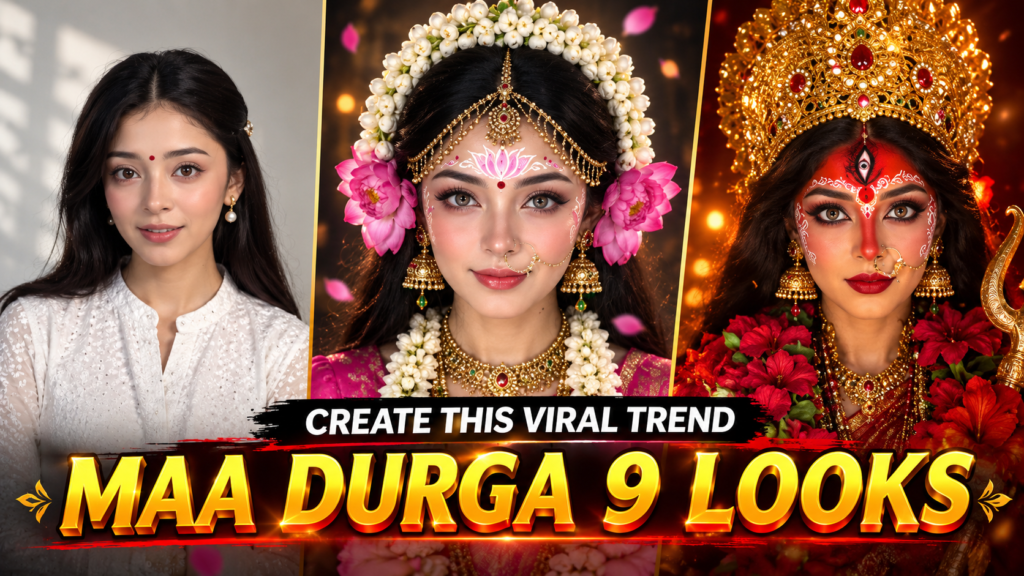
The Maa Durga 9 Looks AI trend is becoming a popular Navratri-style transformation idea on Instagram. The concept is simple but visually impressive: a person starts in a normal outfit and then transforms into different forms of Maa Durga, one after another.
The face can be kept similar to the original photo while AI changes the clothes, jewellery, makeup, background, and overall goddess-inspired appearance.
In this guide, you will find 9 Maa Durga image prompts, 9 video prompts, a bonus Maa Durga finale prompt, and a complete step-by-step method for creating the video.
You mainly need a clear photo, Gemini for creating the images, Google Flow for animating them, and a video editor such as CapCut.
Why Is the Maa Durga 9 Looks Trend Popular?
Navratri is a perfect time for devotional and festival-related content. During this period, people actively watch and share Maa Durga and Navratri videos on social media.
The 9-look format also works well because the video keeps changing. Instead of showing one image for the entire reel, viewers get a new goddess-inspired appearance every few seconds.
This creates curiosity:
- What will the next look be?
- Which form will appear next?
- How different will the outfit look?
- Will the face remain consistent?
These small changes can make viewers stay longer and watch the complete reel.
If you want to create your own version, the prompts below can help you build the complete sequence.
Watch the Reference Video
Before creating your own video, watch the reference version carefully. Pay attention to the timing, transitions, camera movement, lighting and way each look changes into the next one.
You can use the reference video supplied with the original article as a visual guide.
What You Need
You do not need complicated editing software. The basic setup is:
- One clear front-facing photo of yourself
- Gemini for generating the goddess-inspired images
- Google Flow for turning the images into short videos
- CapCut or another video editor for combining the clips
- A suitable Navratri or devotional audio track
For the best results, choose a photo with good lighting. Avoid very dark pictures, heavy filters, sunglasses or images where your face is partly covered.
Maa Durga 9 Looks Prompts (Image + Video)
How to Create the Maa Durga 9 Looks Video
Step 1: Record Your Opening Clip
Start with a short normal video of yourself. You can simply look at the camera, talk, smile, or fold your hands.
Around 5–7 seconds is enough for the introduction.
Step 2: Create the Nine Images
Open Gemini and upload your clear reference photo.
Use the image prompt for the first look and generate the image. After that, repeat the process for all nine forms.
Try to use the same original photo each time instead of changing your reference image.
Step 3: Keep the Face Consistent
AI can sometimes modify facial features while changing the costume.
If this happens, ask Gemini to keep the original facial identity unchanged and only modify the clothing, makeup, hair and surroundings.
A useful instruction is:
Keep the person’s facial identity and facial proportions consistent with the uploaded reference image. Only change the costume, styling, makeup and background.
Step 4: Animate the Images
After creating each image, open Google Flow and use the image-to-video or frames-to-video option available to you.
Choose a 9:16 vertical format and upload the corresponding image.
Then add the video prompt for that particular look.
Step 5: Create All Nine Clips
Repeat the same process for all nine looks.
You can also create the bonus Durga finale if you want the reel to have a stronger ending.
Step 6: Edit Everything in CapCut
Import your intro and all generated clips into CapCut.
Arrange them in this order:
- Normal intro
- Maa Shailputri
- Maa Brahmacharini
- Maa Chandraghanta
- Maa Kushmanda
- Maa Skandamata
- Maa Katyayani
- Maa Kalaratri
- Maa Mahagauri
- Maa Siddhidatri
- Bonus Maa Durga finale
Use quick flash, blur or light transitions between the looks. Try to match each transformation with the beat of your selected audio.
Maa Durga 9 Looks AI Prompts
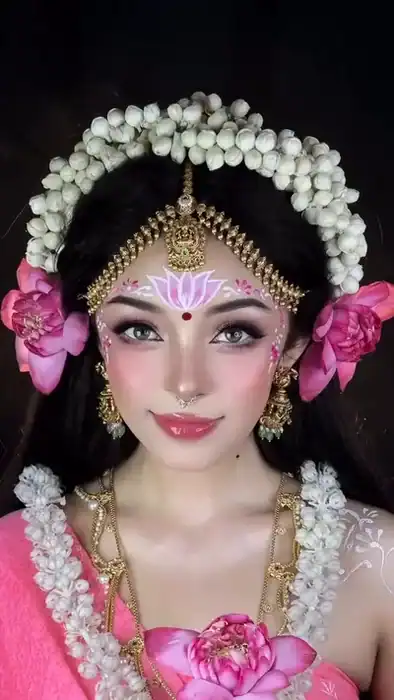
Look 1: Maa Shailputri
The first transformation has a soft and peaceful appearance. The look uses a pink saree, white jasmine flowers, lotus flowers and traditional jewellery.
Suggested duration: About 5 seconds.
Maa Shailputri Image Prompt
🖼️ Maa Shailputri Image Prompt
Maa Shailputri Video Prompt
🎬 Maa Shailputri Video Prompt
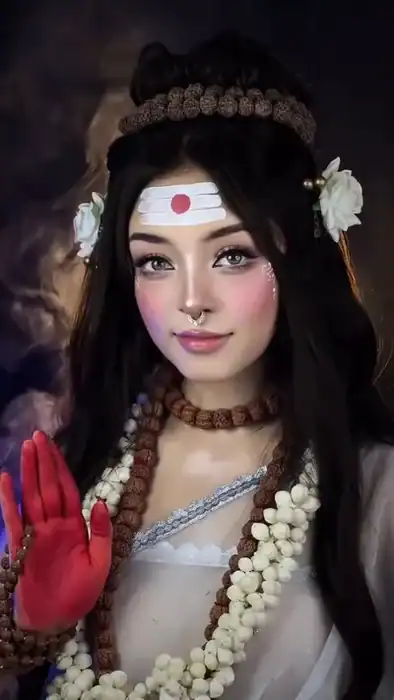
Look 2: Maa Brahmacharini
The second look has a peaceful and spiritual appearance. It uses a white saree, rudraksha beads, jasmine flowers and a simple meditative expression.
Suggested duration: About 4–5 seconds.
Maa Brahmacharini Image Prompt
🖼️ Maa Brahmacharini Image Prompt
Maa Brahmacharini Video Prompt
🎬 Maa Brahmacharini Video Prompt
Look 3: Maa Chandraghanta
This transformation has a royal appearance with a blue saree, golden crescent moon, third-eye design and glowing halo.
Suggested duration: About 5 seconds.
Maa Chandraghanta Image Prompt
Use the uploaded photo as the primary face reference. Keep the person's facial identity, face shape, eyes, nose, lips, jawline and proportions consistent. Do not replace or reshape the face.

Create a highly realistic 9:16 cinematic portrait of the same person as Maa Chandraghanta for Navratri.

Frame the subject from the chest upward at eye level.

Create a midnight-blue background with a large glowing white circular halo behind the head and a dark blue moon-like centre. Add a small amount of atmospheric mist.

Place a golden crescent moon ornament on the head and white flowers on the opposite side. Add long slightly wavy black hair and red sindoor in the hair parting.

Add a decorative third eye to the centre of the forehead with a small red bindi below it.

Use soft grey eyes, smoky eye makeup, gold decorative dots, rosy blush and nude-pink lips.

Add a large traditional gold nath with pearl details and a chain connecting toward the ear.

Use antique gold jhumkas and layered gold temple-style necklaces with green accents.

Dress the subject in a royal blue velvet saree with rich gold embroidery.

Paint the right palm with red alta and place a large magenta flower in the left hand.

Give the subject a confident, slightly playful expression.

Use realistic skin, fabric, jewellery and flower textures with a cool blue and gold cinematic finish.
Maa Chandraghanta Video Prompt
Animate the supplied image without changing the face, identity, crescent moon, third eye, nose ring, blue saree or flower.

Use a 9:16 vertical cinematic frame.

During the first 1.5 seconds, she holds the flower close to her chest and looks slightly upward with a confident expression.

Between 1.5 and 2.5 seconds, slowly rotate the camera approximately 90 degrees to create a sideways frame.

Between 2.5 and 4.8 seconds, rotate the camera back to its normal position. She raises her red alta-painted palm toward the camera in blessing while holding the flower in the other hand.

End with a bright white flash transition.

Keep all movements smooth and realistic and avoid face or hand distortion.
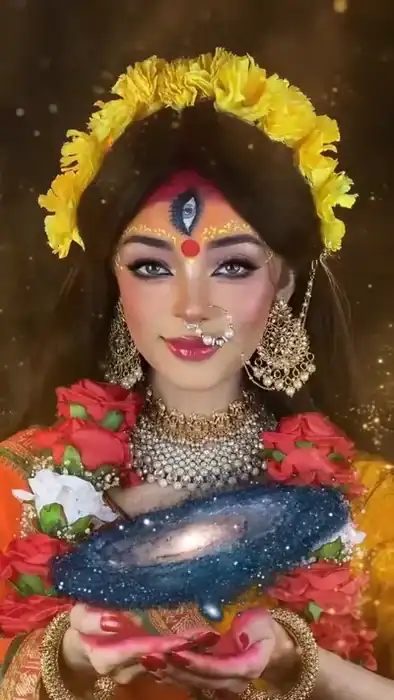
Look 4: Maa Kushmanda
This look represents a bright and creative divine style. It uses yellow flowers, an orange saree, red roses and a small glowing galaxy effect.
Suggested duration: About 4 seconds.
Maa Kushmanda Image Prompt
Use the uploaded photo as the main face reference and maintain the same facial identity and proportions. Do not change the person into another individual.

Create a hyper-realistic cinematic 9:16 portrait of the same person as Maa Kushmanda.

Use a warm golden-brown background with soft bokeh and floating golden particles.

Create a large floral crown made from bright yellow marigold or chrysanthemum flowers around the head. Let long dark hair fall naturally behind the shoulders.

Add red sindoor in the hair parting and a decorative third eye with a large red bindi below it.

Use grey eyes, pink-purple shimmering eyeshadow, winged eyeliner, bright pink blush and glossy pink lips. Add a large pearl-style nose ring connected to the ear with a delicate chain.

Use large gold earrings and a layered pearl and kundan necklace.

Dress the subject in an orange-mustard silk saree with red and gold borders.

Add red and white rose garlands around the shoulders and chest.

Both palms should have red alta and be held together in a cupped position near the chest.

Give her a soft and confident smile.

Use highly detailed realistic textures, warm golden lighting and a cinematic devotional atmosphere.
Maa Kushmanda Video Prompt
Animate the supplied image while keeping the same face, floral crown, third eye, jewellery, saree and garlands.

Use a 9:16 chest-up composition with warm golden lighting.

For the first second, she gently raises her red alta-painted right palm toward the camera.

From 1 to 2 seconds, she lowers her gaze and brings both hands together in a cupped position.

Between 2 and 3 seconds, a tiny glowing galaxy with stars and blue-purple nebula slowly appears above her hands and rotates.

From 3 to 4.1 seconds, she opens her eyes and looks toward the camera with a calm smile while the miniature galaxy continues rotating.

Add subtle golden particles around her.

Keep the motion realistic and the face unchanged.
Look 5: Maa Skandamata
The fifth look has a warm motherly appearance with a golden halo, mustard saree and colourful floral garland.
Suggested duration: About 5 seconds.
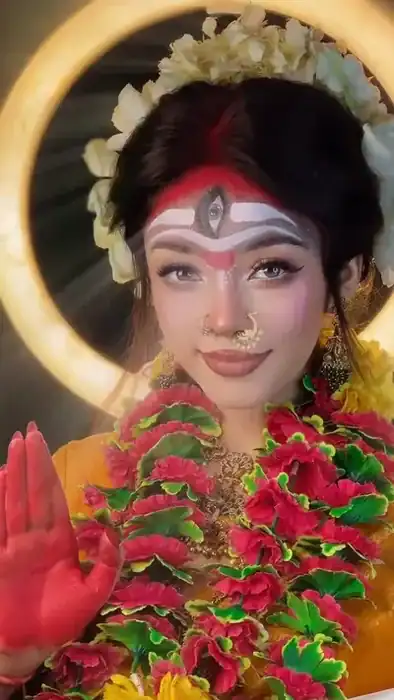
Maa Skandamata Image Prompt
Use the uploaded photo as the primary face reference. Preserve the person's original facial identity and proportions. Do not replace or reshape the face.

Create a highly realistic cinematic 9:16 chest-up portrait of the same person as Maa Skandamata.

Use a dark background with a large warm golden circular halo behind the head. Add soft rays and a few falling pink flower petals.

Style the black hair into a voluminous bun surrounded by an arch of cream-white flowers. Add red sindoor in the hair parting.

Create three white horizontal forehead markings with a silver third-eye decoration. Add red kumkum and a subtle red V-shaped mark.

Use soft grey eyes, elegant makeup, rosy blush and nude-mauve lips. Add a small gold nose ring with pearls.

Use traditional gold jhumkas.

Dress the subject in a mustard-yellow silk saree. Cover the upper chest with a thick red and green floral garland and add yellow marigolds.

Paint the right palm with red alta.

Give her a warm, playful and motherly smile.

Use realistic skin, flowers, jewellery and fabric with warm cinematic lighting.
Maa Skandamata Video Prompt
Animate the image while keeping the face, golden halo, forehead markings, floral crown, garland and saree unchanged.

Use a 9:16 close-up cinematic shot.

Start slightly out of focus with the subject's head lowered.

During the first second, she slowly lifts her head and the camera brings her face into focus.

From 1 to 2.5 seconds, she gives a warm playful smile while flower petals fall gently in front of the camera.

From 2.5 to 4.7 seconds, she raises her red alta-painted palm toward the camera in blessing.

Add a very slow camera push-in and soft golden rays behind her.

Finish with a gentle blur transition.
Look 6: Maa Katyayani
This is the stronger warrior-inspired transformation. The main colours are red, maroon and gold, with a serious expression.
Suggested duration: About 5 seconds.
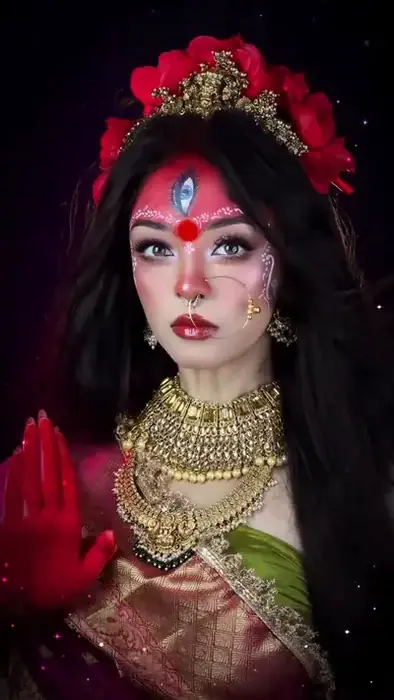
Maa Katyayani Image Prompt
Use the uploaded photo as the primary face reference. Keep the person's facial identity, proportions and features consistent. Do not replace the face.

Create a realistic cinematic 9:16 portrait of the same person as Maa Katyayani, the warrior goddess.

Use a nearly black background with deep purple and magenta light and tiny glowing particles.

Create a crown using red roses and an ornate antique gold mukut. Give the subject long, voluminous black hair flowing around the shoulders.

Add pink-red decorative face paint to the forehead and upper face, with a realistic third-eye design in the centre. Add a bold red bindi and small white decorative dots around the brows and cheeks.

Use expressive grey eyes, strong eyeliner and deep red lips.

Add a silver nose ring with a fine gold chain leading toward the ear.

Use traditional gold jhumkas and heavy layered kundan jewellery.

Dress the subject in a maroon and gold Banarasi-style silk saree with green details.

Raise the right hand toward the camera with red alta on the palm.

The expression should be serious, strong and fearless, with direct eye contact.

Use dramatic low-key lighting, detailed textures and a dark cinematic colour grade.
Maa Katyayani Video Prompt
Animate the image while maintaining the same face, rose crown, forehead design, jewellery and saree.

Use a 9:16 chest-up cinematic frame.

For the first 1.5 seconds, she holds her red alta-painted palm toward the camera and gives an intense direct stare.

From 1.5 to 2.5 seconds, she slowly turns her head slightly to the side while her hair moves naturally.

Around 2.5 to 3 seconds, briefly reduce the light toward near-black.

From 3 to 5.1 seconds, bring the light back as she raises her palm again and looks directly into the camera with a powerful expression.

Add tiny sparkling particles around her.

End by cutting toward black.

Keep the face stable and the movement natural.
Look 7: Maa Kalaratri
This is the most dramatic transformation in the sequence. It uses dark face paint, wild hair, red clothing, silver jewellery and a fiery background.
Suggested duration: Around 8 seconds.
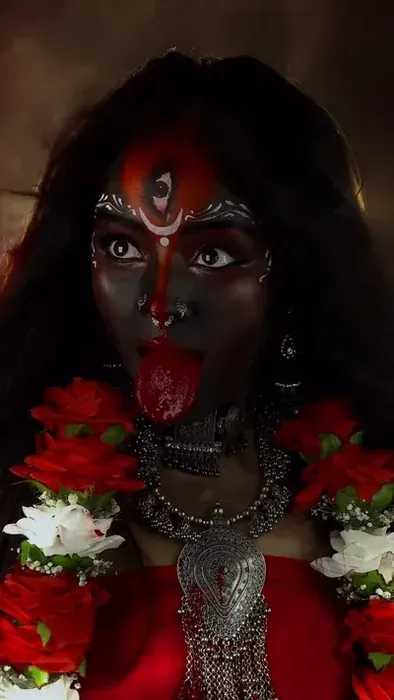
Maa Kalaratri Image Prompt
Use the uploaded photo as the primary identity reference. Keep the original face structure, facial proportions, eyes, nose, lips and jawline consistent. The dark appearance should be treated as makeup or body paint and must not replace the person's identity.

Create a highly realistic cinematic 9:16 portrait of the same person as Maa Kalaratri for a powerful Navratri transformation.

Use a dark smoky brown background with orange fire embers, sparks and warm glowing light.

Give the subject extremely long, wild black hair blowing strongly around the shoulders.

Apply deep black-brown makeup or body paint to the face and neck. Add red pigment around the forehead and eyes, a realistic third eye, a red vertical tilak and a small white crescent-shaped design.

Add white and silver decorative patterns around the forehead and cheeks.

Create intense wide eyes, deep red lips and a dramatic long red tongue-inspired Kali expression.

Use oxidized silver tribal-style jewellery, including a thick choker, large pendant and earrings.

Dress the subject in a red outfit and add thick red and white flower garlands.

The expression should be powerful, fierce and intense.

Use dramatic cinematic lighting, realistic skin and makeup textures, fire particles and a dark devotional fantasy atmosphere.
Maa Kalaratri Video Prompt
Animate the supplied image while preserving the same face structure, identity, makeup, third eye, jewellery, hair and clothing.

Use a 9:16 vertical cinematic composition.

For the first 2.5 seconds, show the camera rotated sideways. Use an extreme close-up of the face with intense eye contact while the hair moves in the wind and orange embers pass through the frame.

From 2.5 to 4 seconds, rotate the camera upright. Keep the subject almost still with a strong expression and flowing hair.

Between 4 and 5.5 seconds, introduce a silver bowl-like ceremonial prop near the head and create a dramatic fierce expression.

From 5.5 to 8.6 seconds, briefly fade toward black and return to the subject looking directly at the camera.

Use a slow push-in toward the end.

Keep the movement cinematic and avoid changing the face or creating unnatural hands.
Look 8: Maa Mahagauri
The eighth transformation has a softer and brighter appearance. White clothing, blue-white flowers, pearls and cool lighting create a peaceful look.
Suggested duration: About 4–5 seconds.
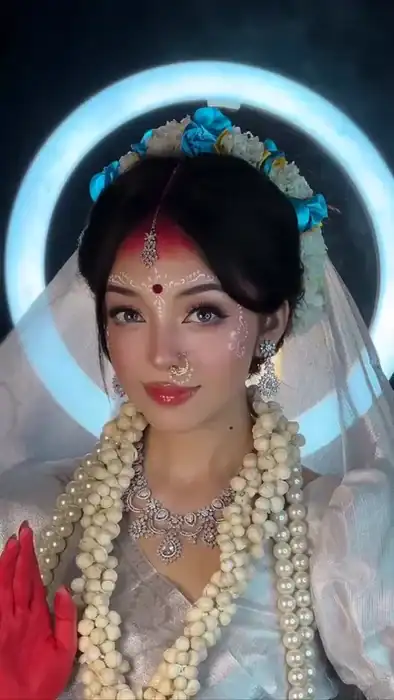
Maa Mahagauri Image Prompt
Use the uploaded photo as the primary face reference. Preserve the person's facial identity, facial structure and proportions. Do not replace the face.

Create a photorealistic cinematic 9:16 portrait of the same person as Maa Mahagauri.

Use a dark teal-blue background with a large glowing icy white-blue circular halo behind the head. Add soft mist and tiny white sparkles.

Create a crown made from teal-blue and white flowers. Add a sheer white veil flowing behind the shoulders.

Style the black hair into a low bun with soft side-swept bangs. Add red sindoor and a silver diamond-style maang tikka.

Use a small red bindi and delicate white decorative dots around the forehead and cheekbones.

Use soft grey eyes, subtle makeup, pink blush and glossy red lips. Add a small silver nose ring.

Use elegant silver earrings, a diamond-style necklace, strings of pearls and jasmine garlands.

Dress the subject in a white and silver saree with soft sheer sleeves.

Raise the right palm toward the camera with red alta.

Give her a gentle, sweet and graceful smile.

Use bright cool lighting and a peaceful cinematic devotional atmosphere.
Maa Mahagauri Video Prompt
Animate the exact image while keeping the face, flower crown, veil, jewellery, hairstyle and saree consistent.

Use a 9:16 chest-up composition.

Begin with a bright white flash.

From 0.5 to 2 seconds, she holds her red alta-painted palm toward the camera and gives a soft smile.

From 2 to 3.2 seconds, slowly move the camera closer while small sparkles appear around her.

From 3.2 to 4.4 seconds, move the camera slightly backward while she raises her hand again.

End with a quick whip-style transition.

Keep the movement elegant, smooth and realistic.
Look 9: Maa Siddhidatri
The final traditional look combines a red saree, blue blouse, gold crown, red flowers and a starry background.
Suggested duration: About 6 seconds.
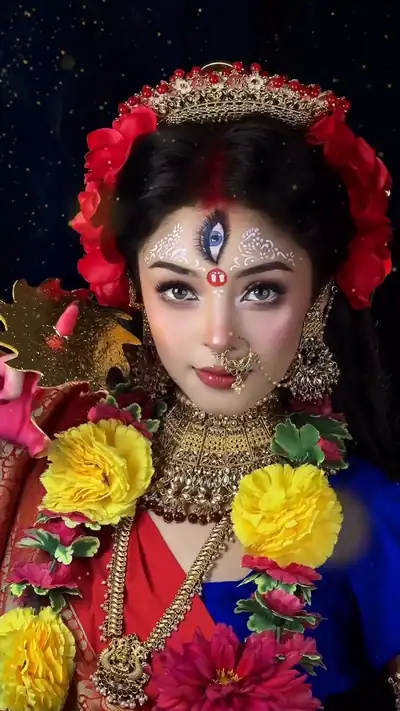
Maa Siddhidatri Image Prompt
🖼️ Maa Siddhidatri Image Prompt
Maa Siddhidatri Video Prompt
🎬 Maa Siddhidatri Video Prompt
Bonus Look: Maa Durga Finale
If you want your reel to have a stronger ending, add this final Maa Durga transformation after the nine forms.
This version has a traditional Durga Puja idol-inspired appearance with a large golden crown, red face decorations, flower garlands and a powerful expression.
Suggested duration: Around 8 seconds.
Maa Durga Finale Image Prompt
Use the uploaded photo as the primary identity reference. Preserve the person's original facial structure, facial proportions, eyes, nose, lips and jawline. Treat the decorative face paint as makeup placed over the same face and do not change the person's identity.

Create a hyper-realistic cinematic 9:16 portrait of the same person styled as Maa Durga with inspiration from a traditional Bengali Durga Puja idol.

Frame the subject from the chest upward with an eye-level camera and a slightly powerful low-angle feel.

Use a dark background with a large glowing white circular halo behind the head and subtle sparkles.

Create a large ornate golden Durga mukut with embossed patterns, pearls, white stones and red gems.

Let long dark hair fall naturally around both sides.

Use traditional idol-inspired red forehead makeup with a third-eye design, red tilak, red bindi, white decorative dots and alpona-inspired patterns around the cheeks and temples.

Create dramatic elongated black-lined eyes with grey irises.

Use deep red lips and a gold nose ring with a chain toward the ear.

Add traditional gold jhumkas.

Dress the subject in a red saree and cover the chest with thick pink, red and green flower garlands and white roses.

Paint the right palm with red alta.

Give the subject a powerful divine expression and direct eye contact.

Use detailed realistic textures, rich red and gold tones, dramatic cinematic lighting and an elegant devotional atmosphere.
Maa Durga Finale Video Prompt
Animate the exact image while keeping the face, identity, large golden crown, face decorations, nose ring, jewellery, saree and flower garlands unchanged.

Use a 9:16 cinematic composition with the glowing white halo behind the head.

From 0 to 1 second, introduce the subject through a burst of golden sparkler-like light while her hands move gently in a traditional mudra-inspired gesture.

From 1 to 3 seconds, keep the body almost still. Only the eyes move as she looks to one side and then returns her gaze toward the camera.

From 3 to 4 seconds, use a short motion-blur flash and have her slowly close her eyes.

From 4 to 6 seconds, she opens her eyes with a strong and dramatic divine expression.

From 6 to 7.9 seconds, she raises her red alta-painted right palm toward the camera in blessing while the camera slowly moves closer.

Add subtle floating sparkles.

Keep the animation smooth, cinematic and realistic. Do not change the person's face.
Each section below contains two prompts:
- Image Prompt — use it in Gemini
- Video Prompt — use it in Google Flow
You can copy each prompt separately.
Tips for Better Results
Here are some simple tricks that can make the final reel look more consistent.
1. Use One Reference Photo
Try to use the same clear photo for all nine transformations. This gives the AI the same facial reference throughout the project.
2. Build Difficult Looks in Stages
Some heavy makeup styles, especially the Kalaratri and final Durga looks, may affect facial consistency.
If that happens, first generate the costume and hairstyle without heavy face paint. Once the base image looks correct, add the decorative makeup in a second generation.
3. Check Video Length
AI video tools can have limits on the maximum length of a generated clip. If one look needs more time than the available generation limit, split that scene into two clips and join them during editing.
4. Keep the Transitions Short
A very long transition can make the reel feel slow.
Try a short white flash, blur or light burst between the different forms.
5. Edit According to the Music
Instead of changing the looks randomly, place each transformation on a strong beat in your selected Navratri audio.
This usually makes the video feel more energetic and polished.
6. Check Every AI Clip
Before posting, watch the complete video once and look for:
- Face changes
- Extra fingers
- Strange hands
- Distorted jewellery
- Moving eyes that look unnatural
- Broken flower details
- Flickering clothes
- Unwanted objects
- Sudden changes in skin tone
If a problem appears, regenerate that particular image or clip instead of rebuilding the whole project.
Maa Durga 9 Looks FAQs
Is the Maa Durga 9 Looks video free to create?
The tools you use may provide free credits or limited free generations, but the exact availability and limits can change. Creating all nine images and videos may require more credits depending on your account and the tools available to you.
Can I make the trend without creating videos?
Yes. You can create all nine images and turn them into a slideshow in CapCut or another editor.
However, adding small camera movements and animations can make the final reel more dynamic.
How can I keep my face consistent?
Start with a clear front-facing photograph and use the same reference image for every look.
Also include a clear instruction telling the image model to preserve the person’s facial identity and only change the styling.
Even then, AI generation can sometimes change facial details, so check each image before animating it.
Can I use these prompts for a boy?
Yes. The concept can be adapted for a male subject as well. You would need to modify the costume, makeup and styling instructions according to the character you want to create.
Can I change the colours and costumes?
Yes. The prompts are starting points. You can change the saree colour, jewellery, flowers, background, lighting and other visual details while keeping the overall concept the same.
Final Thoughts
The Maa Durga 9 Looks AI transformation is a creative way to make Navratri-themed content using image and video generation tools.
The easiest workflow is to create the nine images first, animate each image separately, and then combine everything in CapCut with short transitions and suitable music.
The most important part is consistency. Use one good reference photo, check every generated image, fix any face or hand problems, and make sure the transitions match the music.
With the prompts above, you can create the complete sequence from Maa Shailputri to Maa Siddhidatri, followed by the optional Maa Durga finale.
Jai Mata Di! 🙏

Pratiksha Thakare is a Vedic astrology writer and spiritual researcher with deep study in Jyotish, numerology, and Hindu philosophy. She writes to make ancient wisdom simple and accessible for modern Indian readers.