
Viral aesthetic wallpapers have taken social media by storm. One style currently dominating feeds across Instagram and TikTok is the Ultra-Realistic Black & White Couple Lock Screen, featuring an intimate portrait of a couple seamlessly integrated with an authentic iPhone lock screen UI (complete with the iconic “11:11” clock font, date, and status bar).
If you want to create your own personalized version using photos of you and your partner, you don’t need advanced Photoshop skills. With ChatGPT’s multi-image vision and generation capabilities, you can generate one in just a few minutes.
Here is the complete step-by-step guide and the exact prompt to use.
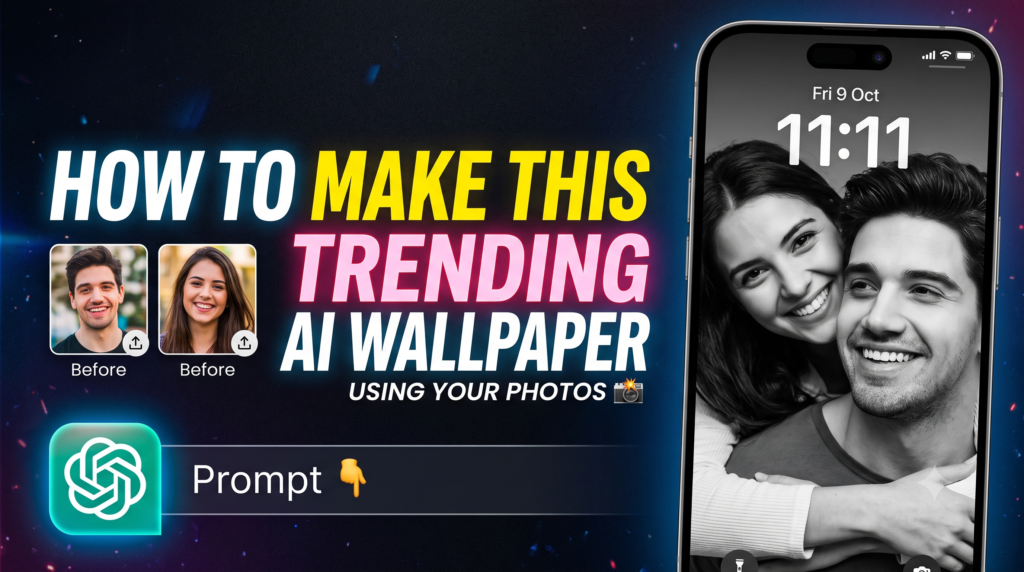
Trending Couple iPhone Lock Screen Prompt
“`htmlAI Image Prompt
Copy the prompt below and create your image
MASTER PROMPT — Ultra-Realistic Black & White Couple iPhone Lock Screen (STRICT 9:16)

REFERENCE IMAGE INSTRUCTIONS:
- Use the uploaded iPhone lock-screen screenshot as the STRICT COMPOSITION and UI REFERENCE (including the clock display "11:11", date "Fri 9 Oct", status bar, battery indicator, and typography overlay).
- Use the uploaded boy's and girl's photographs as STRICT FACIAL IDENTITY REFERENCES to replace the faces accurately while maintaining their realistic facial features and expressions.

COMPOSITION & STYLING:
1. Maintain the exact framing, pose, and positioning from the lock screen reference: the boy smiling gently facing slightly downward/forward in the foreground, with the girl resting close behind his shoulder, subtly peeking over.
2. High-contrast, authentic black & white fine-art photography with deep cinematic shadows, soft natural lighting, realistic skin textures, and sharp focus on both faces.
3. Keep the authentic iPhone lock-screen overlay seamlessly integrated over the image in vertical 9:16 aspect ratio.
What You Need Before You Start
To achieve accurate facial likeness and aesthetic framing, prepare three clear images:
- A Reference Template Screenshot: A screenshot of an iPhone lock screen showing the desired pose, composition, and clock style (e.g., set to 11:11).
- Photo 1 (Boy / Partner A): A clear, front- or three-quarter-facing photo with good natural lighting.
- Photo 2 (Girl / Partner B): A clear, well-lit photo showing recognizable facial features.
Step-by-Step Tutorial
Step 1: Open ChatGPT
- Open the ChatGPT mobile app or web interface.
- Make sure you are using an image-generation-capable model (such as GPT-4o).
Step 2: Upload Your 3 Reference Images
Tap the + (attachment) button and select all three images:
- The lock screen composition template
- The photo of the first person
- The photo of the second person
Step 3: Paste the Master Prompt
Copy and paste the exact prompt below into the message bar:
MASTER PROMPT — Ultra-Realistic Black & White Couple iPhone Lock Screen (STRICT 9:16)

REFERENCE IMAGE INSTRUCTIONS:
- Use the uploaded iPhone lock-screen screenshot as the STRICT COMPOSITION and UI REFERENCE (including the clock display "11:11", date "Fri 9 Oct", status bar, battery indicator, and typography overlay).
- Use the uploaded boy's and girl's photographs as STRICT FACIAL IDENTITY REFERENCES to replace the faces accurately while maintaining their realistic facial features and expressions.

COMPOSITION & STYLING:
1. Maintain the exact framing, pose, and positioning from the lock screen reference: the boy smiling gently facing slightly downward/forward in the foreground, with the girl resting close behind his shoulder, subtly peeking over.
2. High-contrast, authentic black & white fine-art photography with deep cinematic shadows, soft natural lighting, realistic skin textures, and sharp focus on both faces.
3. Keep the authentic iPhone lock-screen overlay seamlessly integrated over the image in vertical 9:16 aspect ratio.
Step 4: Generate and Review
Hit send and allow ChatGPT to generate your photo.
Step 5: Fine-Tune the Result
If the resemblance or clock details need a slight tweak, you can provide quick follow-up instructions:
- “Make the facial features closer to the reference portraits.”
- “Increase contrast and make the black and white tones moodier and sharper.”
- “Ensure the clock time stays strictly as 11:11.”
Step 6: Save and Set as Wallpaper
Once satisfied, download the image in full resolution, transfer it to your phone, and set it as your lock screen or share it on your social feed.
Pro Tips for the Best Output
- Lighting Matters: Avoid photos with harsh filters, heavy makeup distortion, or low-resolution crops. Natural daylight gives the AI cleaner facial geometry to match.
- Aspect Ratio: Stating
STRICT 9:16prevents unwanted square crops and ensures the wallpaper fits modern smartphone screens seamlessly.

Pratiksha Thakare is a Vedic astrology writer and spiritual researcher with deep study in Jyotish, numerology, and Hindu philosophy. She writes to make ancient wisdom simple and accessible for modern Indian readers.