
Have you seen those beautiful Garba dance videos on Instagram featuring a woman in a traditional maroon lehenga, dancing under bright lights surrounded by a festive crowd? These videos look like recordings from a real Navratri celebration, complete with colorful outfits, smooth dance movements, and a lively nighttime atmosphere.
The interesting part is that AI video-generation tools can recreate this style of video using a text prompt and a reference photo.
In this guide, you will learn how to create a Garba Night Dance AI Video using Google Gemini. You will also get a ready-to-use AI prompt, a simple tutorial, practical tips for improving video quality, and solutions to common problems.
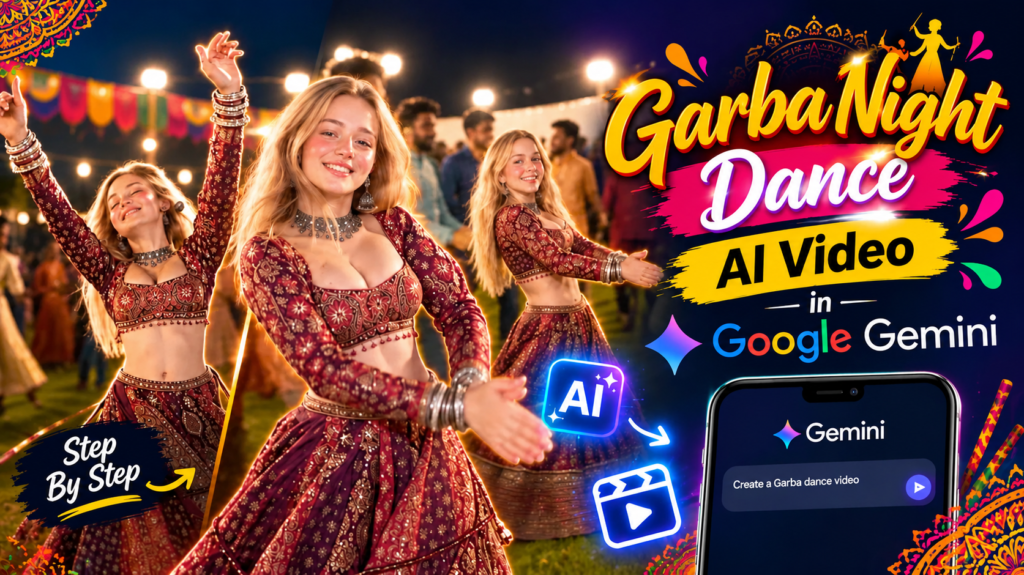
Whether you want to create an Instagram Reel, a YouTube Short, or a festive AI video for your social media account, this tutorial will help you get started.
Garba Night Dance AI Video Prompt
Garba Night Dance AI Video
What Is the Garba Night Dance AI Video Trend?
The Garba Night Dance trend combines traditional Indian dance, festive clothing, cinematic lighting, and AI-generated video effects. The result is a short vertical video that resembles footage captured during a Navratri Garba event.
The main character usually wears a richly decorated lehenga or chaniya choli while performing graceful dance movements. In the background, a large crowd enjoys the celebration under bright outdoor lights.
Several visual elements make this style attractive for social media:
- Traditional Indian fashion: Embroidered lehengas, colorful chaniya cholis, jewelry, and decorative accessories.
- Natural dance movements: Twirling, turning, and flowing fabric that create a lively visual effect.
- Festive surroundings: A nighttime Garba ground filled with people and bright lights.
- Cinematic camera movement: Smooth tracking shots, natural handheld motion, and close-up shots.
- Vertical video format: A 9:16 composition suitable for Instagram Reels and YouTube Shorts.
With a carefully written prompt and a suitable reference image, you can create your own version of this festive video concept.
What Do You Need to Create a Garba Dance AI Video?
Before generating your video, prepare the following items.
| Requirement | Purpose |
|---|---|
| Google Gemini | Access AI features available to your account |
| Reference photo | Helps guide the appearance of your main character |
| AI video prompt | Describes the dance, clothing, lighting, and camera movement |
| Internet connection | Required to access the online tool |
| Video editor (optional) | Useful for adding music, captions, and final effects |
You can access Gemini through the official website at gemini.google.com.
Video generation is subject to the features, usage limits, and subscription options available to your account. If video generation is unavailable, you can create a reference image first and use a compatible image-to-video tool instead.
Garba Night Dance AI Video Prompt for Google Gemini
The prompt below is designed to create a realistic Garba-inspired dance video with traditional clothing, a festive nighttime setting, and smooth camera movement.
You can use your own photo as the character reference if the tool supports image-based video generation. For the best results, choose a clear image with good lighting.
Copy and Use This AI Video Prompt
Create a cinematic, highly realistic vertical video featuring the person from the uploaded reference image performing a graceful Garba-inspired dance at a vibrant outdoor Navratri celebration at night.
Character identity: Use the uploaded image as the primary identity reference for the main dancer. Preserve the person’s recognizable facial features, natural skin tone, hairstyle, and overall appearance. Maintain consistent identity throughout the video. Do not copy another person’s face or introduce unnecessary facial changes. Keep the character’s proportions natural and realistic.
Outfit and styling: Dress the dancer in a beautiful deep-maroon traditional Indian lehenga choli with intricate golden embroidery, delicate mirror work, shimmering details, and a flowing flared skirt. Add an elegant traditional choker necklace, matching earrings, and tasteful festive accessories. Ensure that the clothing moves naturally with every turn and spin.
Dance performance: Show the dancer performing joyful, graceful Garba-inspired steps with rhythmic footwork, gentle arm movements, natural body turns, and a smooth circular twirl. The lehenga should flare realistically during the spins. Maintain believable body balance, natural hand positions, and fluid transitions between dance movements.
Environment: Set the scene in a spacious outdoor Garba ground during a festive Navratri night. Include a lively crowd of people wearing colorful Indian traditional clothing. Add bright overhead floodlights, a dark evening sky, warm decorative lighting, and an authentic celebratory atmosphere. Keep the background crowd slightly out of focus so that the main dancer remains the visual focus.
Camera movement: Begin with a medium-wide tracking shot that captures the dancer and the surrounding celebration. Follow the dancer smoothly during the twirl, using gentle handheld-style camera motion. Transition into a closer shot that highlights the flowing lehenga, natural facial expressions, and sparkling jewelry. End with a stable, flattering shot of the dancer smiling naturally.
Visual quality: Use realistic skin texture, accurate fabric details, natural shadows, cinematic lighting, subtle background bokeh, realistic motion blur, and consistent facial identity. Keep the movements physically believable and avoid distorted fingers, extra limbs, warped jewelry, flickering clothing, or sudden background changes.
Output settings: Vertical 9:16 composition, high-resolution cinematic appearance, approximately 8–10 seconds if supported. Keep the dancer clearly visible and centered throughout the sequence. Do not add text, logos, watermarks, or unnecessary scene transitions.
Reference Video
If you are following a particular dance reference, use it only if your chosen tool supports video references. Otherwise, describe the movement and camera angles directly in your prompt.
You can also modify the prompt to use a different lehenga color, a different background, or a different festive style.
How to Make a Garba Night Dance AI Video in Google Gemini
Follow these steps to create your video.
Step 1: Open Google Gemini
Open Google Gemini on your phone or computer. Sign in with your Google account.
Check whether the video-generation feature is available to you. The interface and available tools may vary depending on your account and region.
Step 2: Prepare Your Reference Photo
If you want the generated dancer to resemble you or a character you have created, prepare a clear reference photo.
For better results, use an image with:
- A clearly visible face.
- Good, balanced lighting.
- Minimal blur or obstruction.
- A hairstyle that is easy to identify.
- A suitable view of the person’s clothing and body position.
Use your own image or an image you have permission to use.
Step 3: Select the Video Generation Feature
Open the available video-generation tool in Gemini. Depending on your account, you may see this feature in the tools menu or through another supported workflow.
If the option is missing, check your account’s feature availability and usage limits. You can also use a compatible AI video generator that accepts images and text prompts.
Step 4: Upload Your Reference Image
Upload your prepared photo if image uploads are supported in the selected video workflow.
Make sure the correct image is attached before submitting the prompt. Clearly identifying the reference image helps the tool understand which person should appear in the generated scene.
If you do not want to use a personal photo, you can generate a fictional character instead.
Step 5: Enter the Garba Dance Prompt
Copy the prompt from this article and paste it into the video-generation interface.
You can personalize a few details before generating the video. For example, replace the maroon lehenga with a red, purple, orange, or pink outfit.
You can also change the setting from a large Garba ground to a decorated festive courtyard, provided the tool supports the requested scene.
Step 6: Generate the Video
Submit your prompt and wait for the generation process to finish.
If aspect-ratio controls are available, select 9:16 vertical format for Instagram Reels and YouTube Shorts. If these settings are not available, request a vertical composition in the prompt.
Review the generated result carefully. If the dance movements, face, or outfit look unnatural, simplify the prompt or try generating another version.
Step 7: Download and Edit Your Video
When the video is ready, download it using the available export option.
You can then open it in an editor such as CapCut or VN to make final adjustments.
Consider adding:
- A suitable Garba or Navratri soundtrack.
- Beat-matched cuts or transitions.
- Light color correction.
- A short opening caption.
- A clean ending that works well when the Reel loops.
Use music that you are permitted to use on your chosen platform, especially if you plan to publish the video commercially.
Best AI Tools for Creating Garba Dance Videos
Different tools are useful at different stages of the process.
| Tool | Main Use | Difficulty |
|---|---|---|
| Google Gemini | Generating video when the feature is available | Easy |
| Google Flow | Creating AI videos with a cinematic workflow | Easy to Medium |
| ChatGPT | Developing prompts and creating reference images | Easy |
| CapCut | Adding music, captions, and effects | Easy |
| VN Video Editor | Basic editing and arranging clips | Easy |
| Leonardo AI | Creating character and outfit reference images | Medium |
You do not need every tool listed above. Start with a reference image and one video-generation tool. Add an editor only if you want to improve the final presentation.
Remember that access, pricing, and specific features may change over time.
Tips for Getting More Realistic Garba Dance Results
A detailed prompt can help, but the reference image and the video tool also affect the final output.
1. Describe the Dance Clearly
Avoid asking for too many unrelated movements in a short video. Focus on a few actions, such as rhythmic steps, a graceful turn, and one flowing spin.
2. Keep the Outfit Consistent
Specify the same lehenga color, embroidery style, jewelry, and hairstyle throughout the video. This can reduce unwanted changes between frames.
3. Use Realistic Lighting
Describe warm floodlights, a dark night sky, natural shadows, and soft background lighting. These details help establish the atmosphere of an outdoor celebration.
4. Keep the Background Secondary
Ask the tool to maintain a lively crowd while keeping the main dancer in focus. Too many detailed background actions may distract from the central performance.
5. Choose a Short Duration
An 8–10-second clip is a practical starting point for this concept. A shorter scene can be easier to control than a long sequence with several complicated dance steps.
Actual generation limits depend on the selected tool.
6. Improve the Prompt After Each Attempt
If the face changes, reinforce identity consistency. If the hands or jewelry look distorted, reduce the complexity of the movements. If the skirt looks stiff, emphasize realistic fabric physics and natural spinning motion.
7. Review the Final Video Before Posting
Check for unnatural facial expressions, distorted body parts, inconsistent clothing, and background glitches. AI-generated videos can contain these errors even when the prompt is detailed.
Common Problems and How to Fix Them
| Problem | Possible Solution |
|---|---|
| The face looks different | Use a clearer reference photo and reinforce identity consistency |
| The lehenga changes color | Repeat the chosen color and outfit description |
| Dance movements look stiff | Request fewer movements and more natural body motion |
| The hands look distorted | Simplify hand gestures and avoid complicated choreography |
| The background looks artificial | Describe realistic lighting, crowd depth, and natural shadows |
| The video is not vertical | Select 9:16 if available or reinforce vertical framing in the prompt |
| Video generation is unavailable | Check account access or try a compatible alternative tool |
Frequently Asked Questions
1. Can I create a Garba Night Dance AI Video for free?
You may be able to use available free AI features, depending on your account, region, and current usage limits. Video generation is not guaranteed to be available free to every user. Check the feature and pricing information shown in your account.
2. Can I use my own photo in a Garba AI video?
Yes, if the video-generation tool supports image references. Upload a clear photo and explain that the generated character should retain the person’s recognizable appearance. Results may vary, so always review the final video.
3. Which lehenga color looks best for a Garba night video?
Deep maroon, red, purple, orange, and bright pink can all work well against a nighttime background. Gold embroidery and mirror-work details can add visual richness under festive lights.
4. Why does my AI Garba video look unrealistic?
Common reasons include a low-quality reference image, overly complicated dance instructions, inconsistent lighting, and limitations in the video model. Simplifying the choreography and describing the scene more clearly may improve the result.
5. Can I create a Garba AI video in a 9:16 format?
Yes, when the selected tool supports vertical video output. If the interface provides aspect-ratio controls, choose 9:16. Otherwise, include vertical framing instructions in your prompt, although the final dimensions may depend on the tool.
6. Can I use this video for Instagram Reels and YouTube Shorts?
You can generally publish AI-generated videos on these platforms, subject to their current rules, music rights, and applicable disclosure requirements. Make sure you have permission to use any reference images, recognizable people, and music included in your video.
7. How can I make the lehenga spin look more natural?
Use instructions such as “graceful circular twirl,” “realistic flowing fabric,” and “natural movement driven by body rotation.” Avoid requesting multiple fast spins and complicated steps in a very short clip.
8. Which music should I add to a Garba dance Reel?
Choose a festive Garba or Navratri track that matches the rhythm of the dance. Use music from the platform’s permitted music library or obtain the necessary rights before publishing.
Final Thoughts
Creating a Garba Night Dance AI Video is a fun way to experiment with traditional Indian fashion, festive settings, and AI-powered video generation. With a clear reference image and a well-structured prompt, you can create a short dance clip that captures the energy of a Navratri celebration.
Start with the prompt provided in this guide, keep the choreography simple, and experiment with different outfits and lighting styles until you find a result you like.
Before publishing, review the video for visual errors and ensure that you have permission to use the images and music included in your final edit.
If you enjoy creating AI images, viral video concepts, and social media edits, keep exploring new prompts and techniques to develop your own creative style.

Pratiksha Thakare is a Vedic astrology writer and spiritual researcher with deep study in Jyotish, numerology, and Hindu philosophy. She writes to make ancient wisdom simple and accessible for modern Indian readers.