
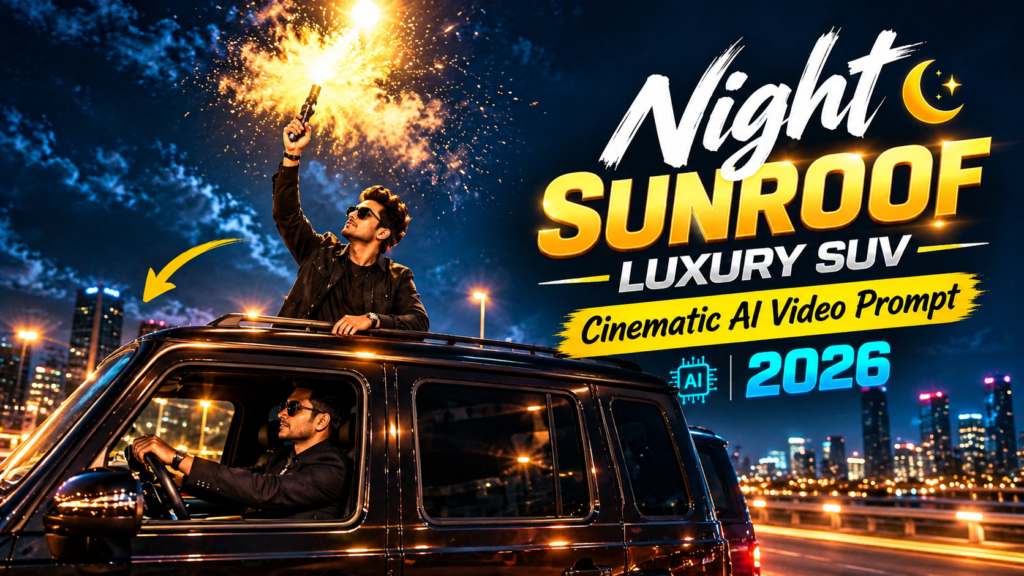
Have you seen those cinematic Instagram Reels where a person stands through the sunroof of a luxury SUV while driving on a beautiful night highway?
The scene looks like it was recorded with an expensive camera, a luxury car and a professional film crew. But you can create a similar style of video with AI without actually arranging a night shoot.
In this guide, I’ll explain how to create a night sunroof luxury SUV AI video using a photo of yourself, an AI image generator, an image-to-video tool and a simple video editor.
You don’t need advanced editing skills. If you can upload an image and copy a prompt, you can try this trend.
VIRAL VIDEO PROMPT
REFERENCE VIDEO
What Makes This AI Car Video Look Cinematic?
The main attraction of this trend is its movie-like appearance.
A typical video includes:
- A luxury SUV driving on a dark highway
- A person standing through the vehicle’s sunroof
- A stylish dark outfit
- Warm street lights in the background
- Reflections on the car’s body
- A slow and smooth camera movement
- A dark, premium-looking environment
- A sparkling or misty effect near the ending
The combination of these elements gives the video a luxury night-drive feeling.
The good thing is that you can change several details according to your preference. For example, you can use a black SUV instead of a maroon one, change the outfit or create a different background.
What Do You Need?
Before starting, keep these things ready:
| Tool | Purpose |
|---|---|
| ChatGPT | Create the cinematic image |
| Google Gemini or Flow | Turn the image into a video |
| CapCut or VN | Add music and final effects |
| Clear personal photo | Used as the character reference |
A clear front-facing photo usually works better because the AI has more facial details to work with.
Try to avoid photos that are heavily blurred, have the face covered or have very poor lighting.
Step 1: Create the Luxury SUV Image
First, create the main image that will later be animated.
Open your preferred AI image generator and upload your photo.
Tell the AI to keep your identity recognizable while placing you inside the new cinematic scene.
You can use a prompt like this:
AI Image Prompt
Create a highly realistic vertical 9:16 cinematic photograph using the uploaded person as the main character.

Keep the person's identity, facial features, hairstyle, skin tone and overall appearance consistent with the reference photo.

Place the person standing naturally through the sunroof of a premium maroon luxury SUV driving on an empty highway at night.

The person is wearing a stylish dark jacket and has a confident, relaxed expression.

The highway is surrounded by soft warm street lights, subtle reflections and a dark cinematic atmosphere.

Show realistic vehicle reflections, natural skin texture, realistic clothing details and believable lighting.

Use a premium movie-style look with shallow depth of field, realistic shadows, subtle motion atmosphere and high detail.

The composition should look like a professionally filmed luxury automobile commercial.

Vertical 9:16 composition, photorealistic, cinematic night photography, realistic proportions, natural face, detailed environment.
After generating the image, carefully check the face, hands, body position and car.
If something looks strange, generate another version instead of trying to fix everything manually.
Important Tip
Don’t expect every generation to be perfect.
AI images can sometimes create problems with:
- Fingers
- Hands
- Facial details
- Clothing
- Vehicle shape
- Body proportions
Generate a few versions and select the most realistic one.
Step 2: Convert the Image Into a Video
Once you have a good image, the next step is animation.
Upload the image to an image-to-video AI tool such as Google Flow or another supported video generator.
The goal is to create slow, realistic movement instead of making the entire scene move too quickly.
You can use this type of prompt:
Video Prompt
Create a short photorealistic cinematic vertical 9:16 video from the supplied image.

Keep the person's identity, face, hairstyle, clothing and body proportions consistent throughout the entire video.

The luxury maroon SUV slowly moves forward along an empty night highway.

The person remains standing naturally through the sunroof with a calm and confident expression.

Use a smooth cinematic camera movement that slowly tracks alongside the moving SUV.

Warm street lights pass naturally in the background and create soft golden reflections on the vehicle.

Keep the person's face stable and realistic throughout the shot.

Add subtle environmental motion, realistic vehicle movement, natural clothing movement and believable nighttime lighting.

Near the final moment, introduce a beautiful sparkling mist and small glowing particles around the scene, creating a stylish celebration effect.

Do not create sudden camera movements, distorted faces, extra people, duplicated body parts or unrealistic vehicle movement.

Premium luxury automobile commercial style, realistic physics, cinematic depth of field, natural motion, high detail, photorealistic.
Keep the Camera Movement Slow
One of the biggest mistakes is asking the AI for too much movement.
If the camera moves extremely fast, the person’s face and body may become distorted.
A slow tracking shot usually works better for this type of reel.
Step 3: Generate Multiple Versions
Don’t stop after the first generation.
AI video tools can produce different results even when you use the same image and prompt.
Try generating two or three versions if possible.
Look for the version where:
- The face remains stable
- The car looks realistic
- The person’s body doesn’t change
- The highway movement looks natural
- The camera movement is smooth
- The final sparkle effect looks clean
Choose the strongest version for editing.
Step 4: Edit the Video in CapCut or VN
After generating the video, import it into CapCut or VN.
You don’t need heavy editing.
A few simple changes can make the video look much better.
Add Cinematic Music
Choose a suitable cinematic, luxury or bass-heavy audio track.
The music should match the speed of the video.
Adjust the Color
A slightly warm cinematic grade can make the street lights look more attractive.
Don’t make the video extremely dark. You still want the person’s face and SUV to remain visible.
Add Slow Motion
If the final sparkle or mist appears for only a short moment, slightly slowing that section can make the ending more dramatic.
Use the Correct Ratio
Keep the final project at:
9:16 vertical
This is suitable for Instagram Reels, YouTube Shorts and similar short-video platforms.
Simple Editing Structure
You can structure a 10-second video like this:
| Time | Scene |
|---|---|
| 0–2 sec | Show the SUV and person |
| 2–5 sec | Smooth driving and camera movement |
| 5–8 sec | Highlight the luxury night atmosphere |
| 8–10 sec | Add the sparkling celebration effect |
The first few seconds are especially important.
Start with the strongest visual instead of spending too much time on an empty background.
How to Make the Video More Realistic
Small details can make a big difference.
1. Use a Good Reference Photo
Your source image should be clear and preferably show your face from the front.
2. Keep the Prompt Consistent
Don’t completely change the person’s clothes, appearance and environment between the image and video prompts.
Consistency helps the video model maintain the same character.
3. Avoid Excessive Motion
Slow movement is usually safer for face consistency.
4. Keep Lighting Natural
Use phrases such as:
- Warm street lights
- Soft reflections
- Natural shadows
- Realistic nighttime lighting
- Cinematic depth of field
5. Generate Several Attempts
The first result isn’t always the best result.
If the face looks different or the vehicle becomes distorted, try another generation.
Things You Should Avoid
There are a few common mistakes that can reduce the quality of your AI reel.
Using a Blurry Photo
A low-quality reference image gives the AI fewer facial details to work with.
Asking for Too Much Movement
Fast camera rotations, running, jumping and complicated actions can make the character unstable.
Adding Too Many Effects
A cinematic video doesn’t need dozens of transitions and effects.
Keep it clean.
Making the Video Too Dark
Night scenes look better when the subject is still clearly visible.
Changing Everything at Once
If you want to change the car color, outfit, location and camera angle, do it carefully. Too many changes can make the result inconsistent.
AI Tools for This Workflow
Here is a simple overview of the tools you can use:
| Tool | Main Use | Beginner Friendly |
|---|---|---|
| ChatGPT | Image creation and prompt help | Yes |
| Google Gemini | AI image/video workflows | Yes |
| Google Flow | Cinematic AI video generation | Yes |
| CapCut | Music and final editing | Yes |
| VN | Basic video editing | Yes |
| Leonardo AI | Image creation and variations | Yes |
| Midjourney | Creative image generation | Medium |
You don’t need to use every tool.
For beginners, a simple workflow is:
AI image generator → image-to-video tool → CapCut/VN
Can You Change the SUV Color?
Yes.
You can replace the maroon SUV with almost any color you prefer.
For example:
- Black luxury SUV
- White SUV
- Dark blue SUV
- Silver SUV
- Metallic grey SUV
Simply change the vehicle description in the image prompt.
You can also change the environment from a highway to a city road, mountain road or another suitable location.
Can Girls Create This AI Reel Too?
Yes.
The concept isn’t limited to male characters.
You can change the character description according to your preference.
For example, you can describe:
- A woman wearing a black jacket
- A woman wearing a stylish saree
- A woman wearing a party outfit
- A woman wearing a casual streetwear outfit
The basic workflow remains the same.
Can You Make This Video Without a Real Luxury Car?
Yes.
That’s one of the main advantages of AI video generation.
You can create the vehicle, road, lighting and environment digitally.
However, AI-generated videos can sometimes contain visual mistakes. Always check the final video before posting it.
Frequently Asked Questions
Do I need a real luxury SUV?
No. The SUV can be generated as part of the AI scene, so you don’t need to arrange a real vehicle or location.
Can I use my own photo?
Yes. A clear photo of yourself can be used as the character reference. Use an image that you have the right to use.
Why does my face sometimes change in the AI video?
AI video models can struggle with identity consistency, especially when there is a lot of movement.
Using a clear reference image and requesting stable facial features can help.
Can I change the color of the car?
Yes. Change the vehicle color in your image prompt. You can use black, white, blue, silver or another color.
How long should the video be?
For a Reel or Short, around 8–12 seconds works well for this particular style.
You can make it longer, but short videos are easier to keep visually consistent.
Can I edit the video in CapCut?
Yes. CapCut can be used for music, trimming, slow motion, color adjustments and other basic edits.
Why does my AI video look unrealistic?
This can happen because of the reference image, prompt, motion settings or AI generation itself.
Try using a clearer photo, reducing camera movement and generating another version.
Can I upload the video to Instagram Reels?
Yes. A vertical 9:16 version is suitable for Instagram Reels and other short-video platforms. Make sure any music, images or other assets you use are properly licensed or available for your intended use.
Final Result
Creating a luxury night sunroof AI video is much easier than it first appears.
You mainly need a good reference photo, a strong cinematic image prompt, an image-to-video tool and some simple editing.
The most important part is not adding hundreds of effects. Focus on realistic lighting, stable facial details, smooth camera movement and a clean ending.
Try a few different versions and choose the one that looks the most natural.
With the right combination of image, motion and editing, you can create a short AI reel that has the same premium night-drive feeling without arranging a real car shoot.
Tip: If you want better results, experiment with different SUV colors, outfits, locations and camera angles while keeping the person’s identity consistent.
Table of Contents

Pratiksha Thakare is a Vedic astrology writer and spiritual researcher with deep study in Jyotish, numerology, and Hindu philosophy. She writes to make ancient wisdom simple and accessible for modern Indian readers.